Hi everyone, welcome to our August newsletter.
This month, we shipped major updates to both the in-house and law firm sides of Lumios. We built them as we onboarded more firms onto larger cases and brought more in-house teams live on larger portfolios.
For in-house teams, we've started running portfolios where Lumios automates the workflow from intake all the way through discovery. Lumios now drafts responses to new demands from a response bank of your team's past answers, and it can track every deadline across your matters on one calendar you can sync to your own. Anyone at your company can now open a matter on a form, through a link, without an account, and Lumios will fill it in for them and run the opening sequence off the submission. And once your matters are in, you can filter your portfolio down by any characteristic you'd like, manage spend and invoices directly from within the product, and run holds and collections across the board. We've already run collections across Slack, Gmail, Drive, Outlook, and more, for law firms and in-house teams alike.
On the litigation side, we're now live across many nine-figure cases, from class actions and arbitrations to many other case types. Lumios can now suggest coding tags for a case, and apply them across every document, and it can now sync to your docket with a PACER integration. The Case Assistant applies those tags for you on command, overlay export sends your coding and AI analysis back if your co-counsel uses a legacy platform, and the documents index is a lot more malleable. You can share a chat or a piece of work product with anyone on the case, and when the other side produces, you can run a linear document review from within Lumios, built to get them through documents fast.
All of our updates have come from iteration and customer feedback. Here's the rundown, split into updates for in-house counsel and litigation teams.
The response bank NEW
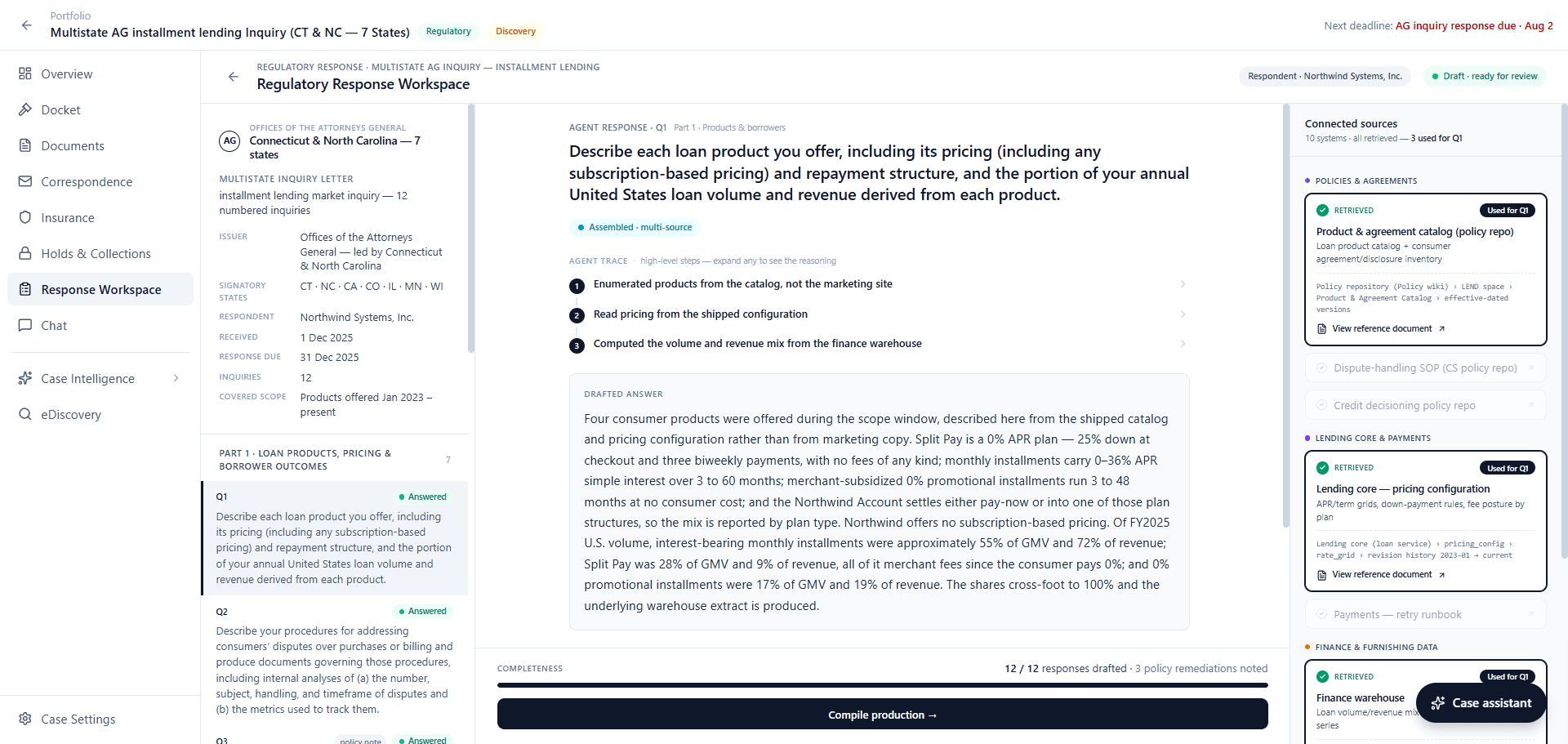
Most inquiries, whether they're common regulatory requests, subpoenas, interrogatories, or otherwise, can be fairly similar. Now, Lumios stores your team's past responses in a response bank and pulls from them to draft the response to a new one.
In the response workspace, Lumios splits a demand into its numbered questions, answers each one out of the systems you have connected, and names the ones it used. Anything you edit and finalize goes into the bank. The bank belongs to your whole legal department, so the next person working a similar demand gets your team's earlier answer under the new draft.
The deadlines calendar NEW
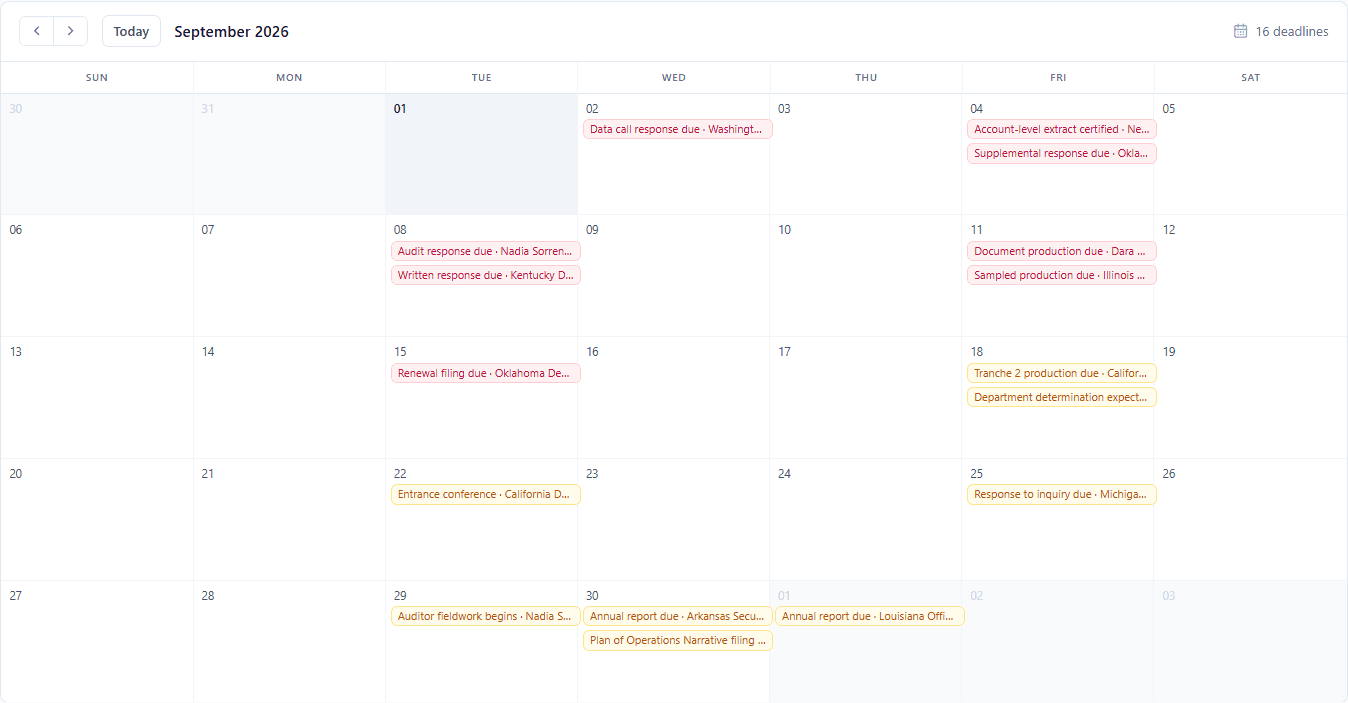
Instead of tracking deadlines for litigations, arbitrations, subpoenas, and regulatory exams in spreadsheets and scattered datasets, you can now track all of them in Lumios. Lumios reads the deadlines out of the documents it takes in and keeps track of your whole portfolio in a native calendar view, each date labeled with what it is and which matter it belongs to. You can jump straight from any date to the matter behind it. Lumios can also sync those deadlines to the calendar your team already runs on, whether that's Google, Outlook, or something else.
The matter intake form NEW
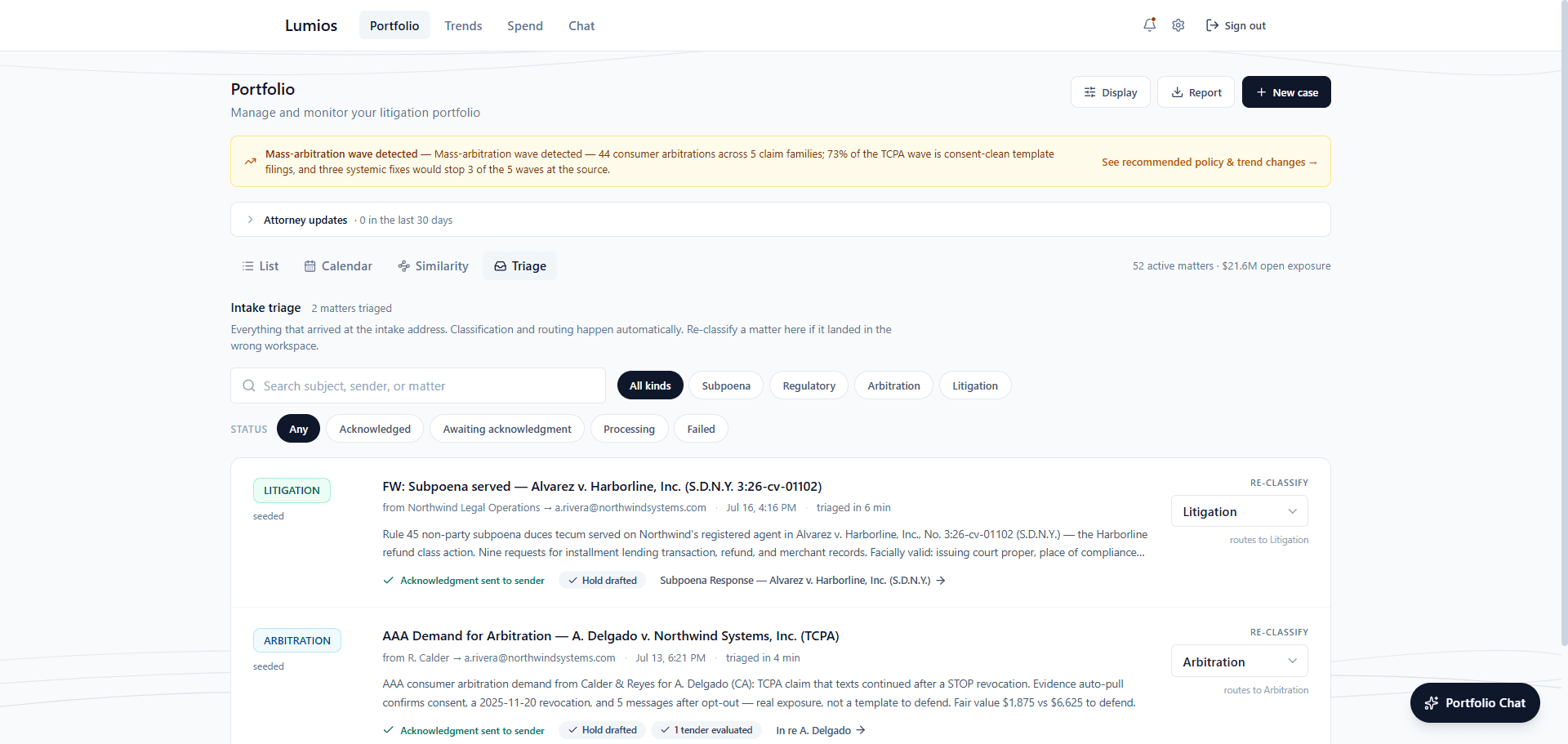
Anyone at your company can now open a matter on a matter intake form, through a link, without an account, and you decide which email domains can get in. They can paste the notes they have or upload the complaint they were handed, and Lumios will fill in the matter type, the description, the parties, the deadlines, and the attorney handling it, for them to correct before they submit. They can name the outside firms on the matter too, and Lumios will match them against your firm list, create any firm you have never worked with, and set up its portal account. It joins your intake address as a second way in, and both arrive in the same triage list.
Lumios can then run the whole opening sequence off that submission, naming the custodians out of your identity directory, sending their hold notices and the preservation directive to IT, and running the collection. You can choose which of those steps run automatically, once, for your whole company. Every matter that comes in gets its own category, with regulatory, subpoena, litigation, and arbitration as the defaults and your own categories on top, and each category runs its own automated workstream. The earliest deadline in the papers is on the matter's row from the moment it is submitted.
The portfolio
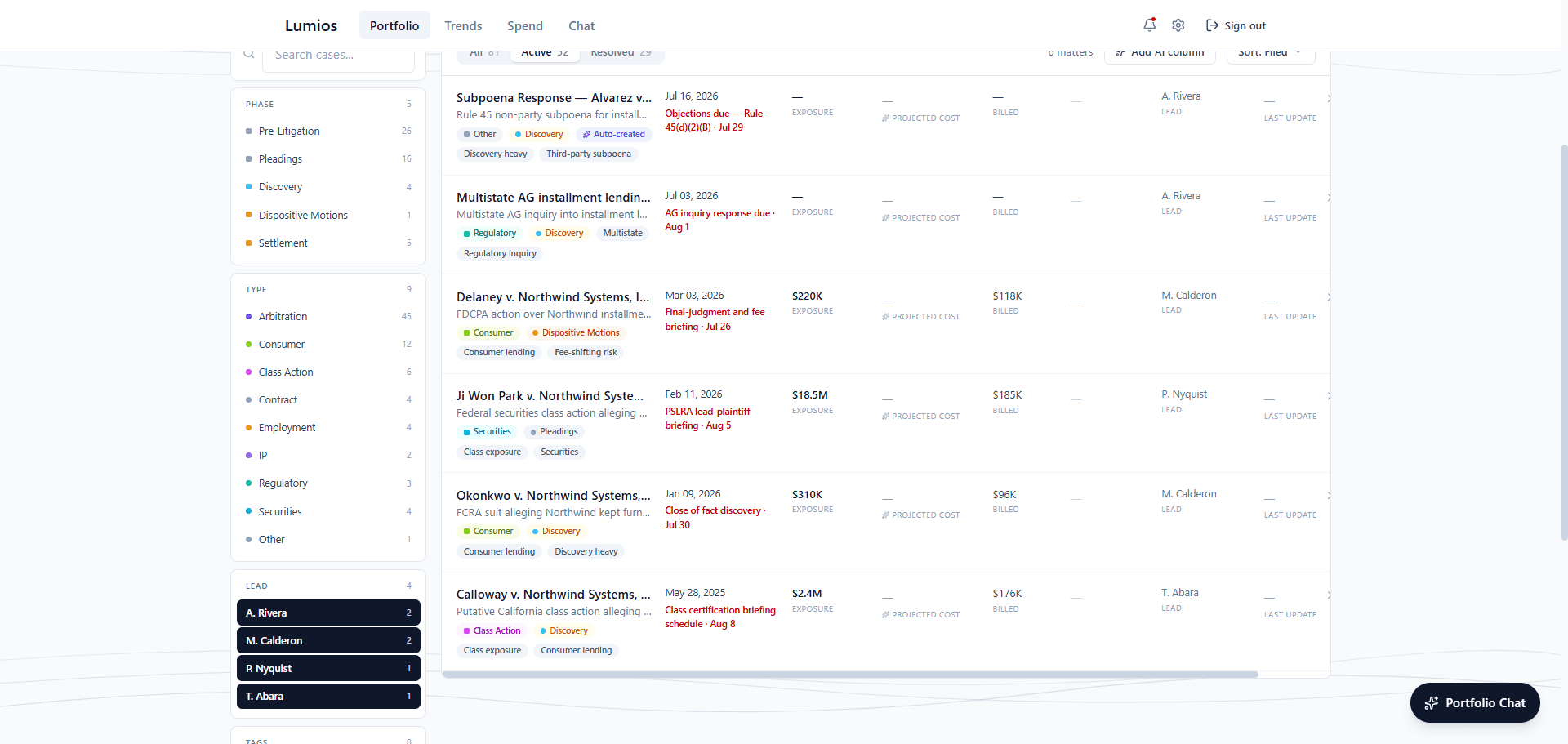
You can now get a lot more insight out of the portfolio. Every matter tracks the attorney who owns it, and you can filter down to tags you add to matters for better search and visibility. Each row shows the next deadline on the matter, its exposure, and what you have billed against it. All of this data can also sync to externally integrated systems, like ERPs and other internal stores, so everything stays current and all of the litigation data you want to view can be seen from one place.
Legal spend
You can now settle a disputed invoice line without leaving the review. Zero out a line you will not pay and Lumios adjusts the total, leaving the numbers the firm sent you exactly as they arrived. Every invoice keeps an activity log of who did what to it and when.
Spend reporting is live too. You can upload the export from the billing system your company runs and get the finished workbook back, with an audit of everything Lumios read before you download it. It connects to your ERP system to automate spend workflows too, so a new firm that comes in through intake reaches your finance system without anyone rekeying it.
AI tagging NEW
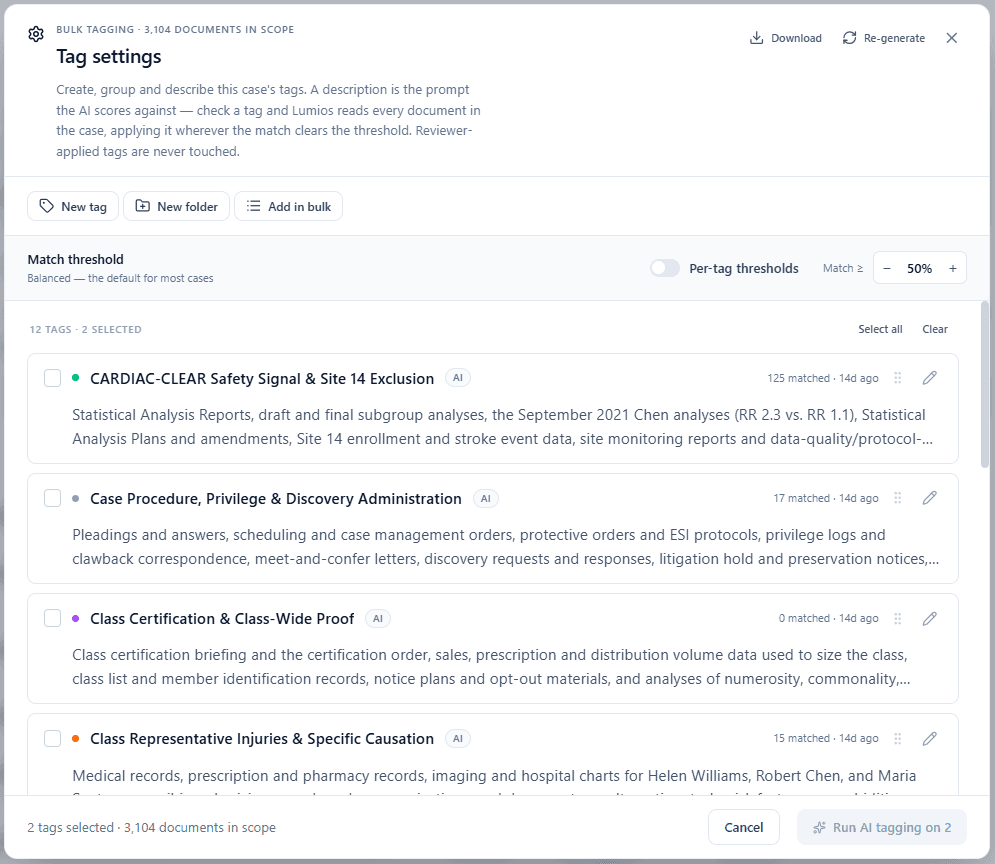
You can now apply tags across a whole document set with AI. You describe a tag in a sentence, and Lumios applies it wherever the match clears the confidence threshold you set. Lumios matches on meaning, not keywords.
Lumios can now propose the tags themselves too. When you set up a case, it reads the allegations across the pleadings and proposes a tag taxonomy for that case, so your team opens the case with a working set of tags already on it. Lumios can also generate new tags whenever the case evolves, based on new documents or the docket, whenever you'd like.
You can set a threshold for the AI's confidence requirements when applying tags, from broad, which is inclusive, to strict, which is tighter. You can also give one tag its own threshold when it needs to be stricter than the rest. Human and AI tags are always kept separate, and you can always see which is which.
The Case Assistant NEW
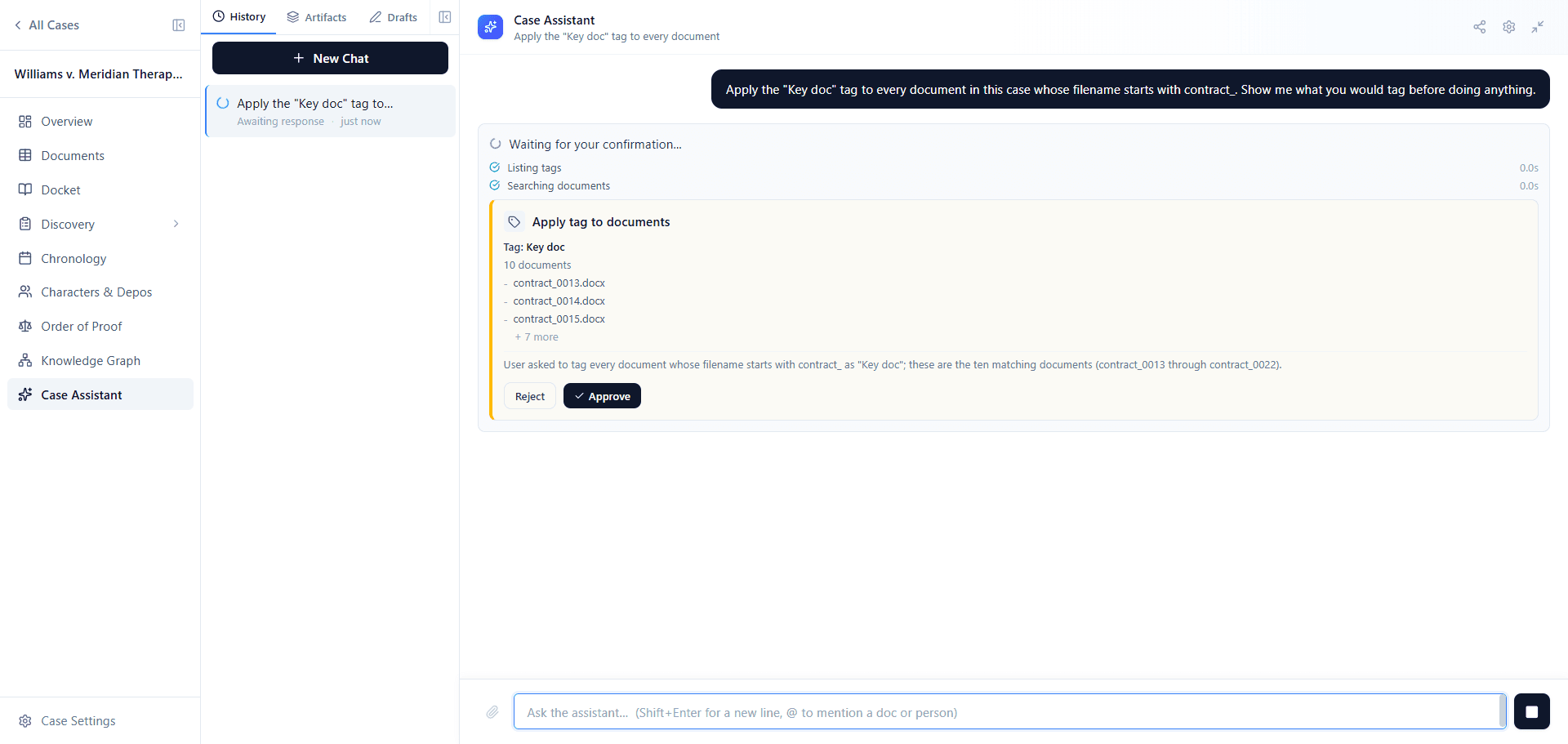
The Case Assistant can now apply tags for you. Tell it to create tags, apply tags across specific filters of documents, or run AI tagging using specific descriptions. Lumios comes back to ask for your confirmation, naming the tag, restating your criterion in plain words, counting how many documents match, and listing a few of them. Once you approve, Lumios will apply the tag across every matching document in the case.
The docket NEW
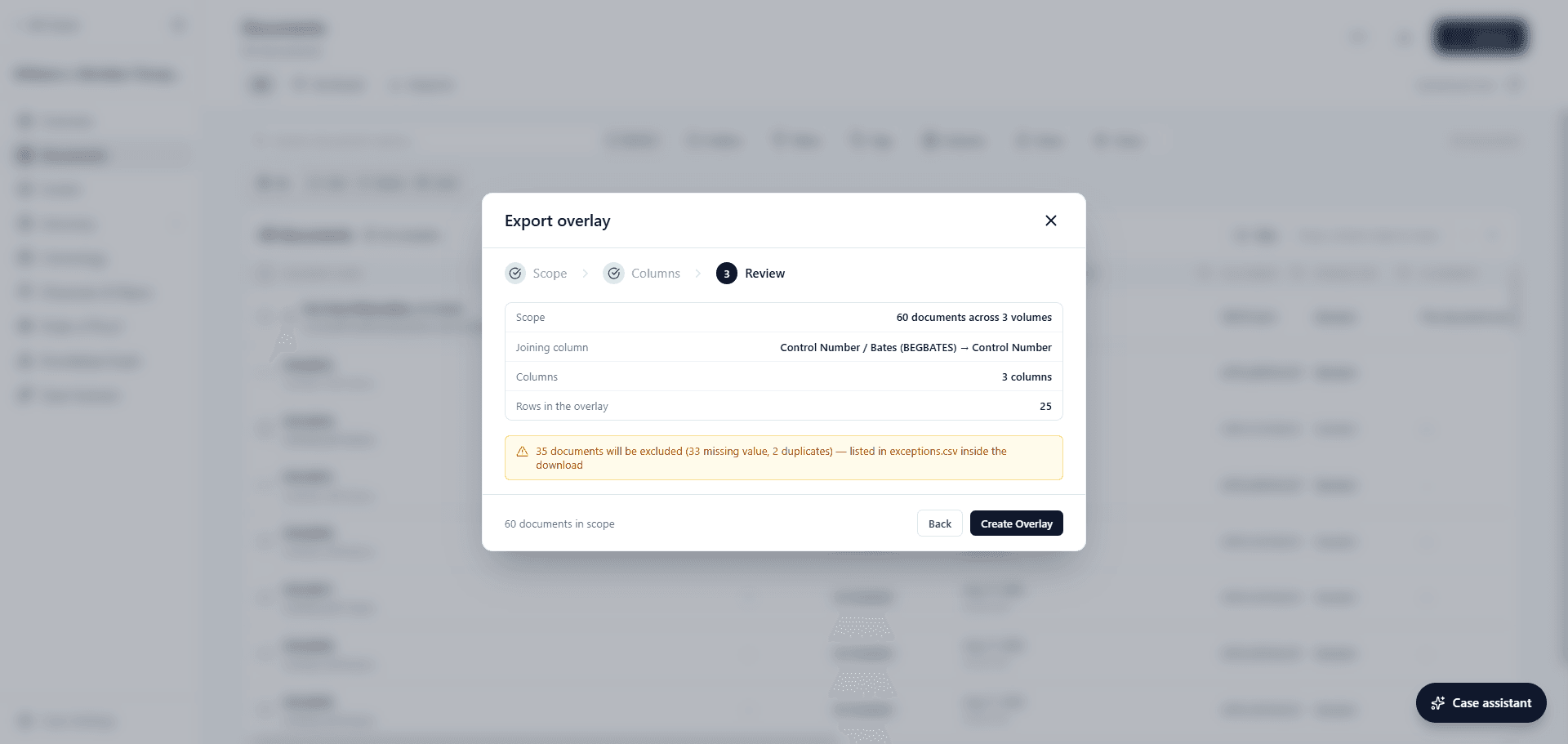
The docket can now sync directly to the court record. Lumios keeps it current by syncing with PACER and other sources, including state court profiles, every 24 hours. You can search for a docket by number, by party, or by case name, link it to your case, and Lumios will pull the history in.
You're also able to check for new filings whenever you want, if you'd prefer to select specific filings instead of syncing to the live docket. Lumios shows you what it found, and the cost of anything paid, before it imports. And if you'd prefer to use your own PACER or other court credentials, Lumios can now connect to your PACER account directly.
You can also start a whole case straight from a docket number. Give the From Docket wizard a court and a docket, pick the filings that open the case, and Lumios will create it, read those pleadings, and set up the allegations, the claims, and the tags off them.
Overlay export NEW
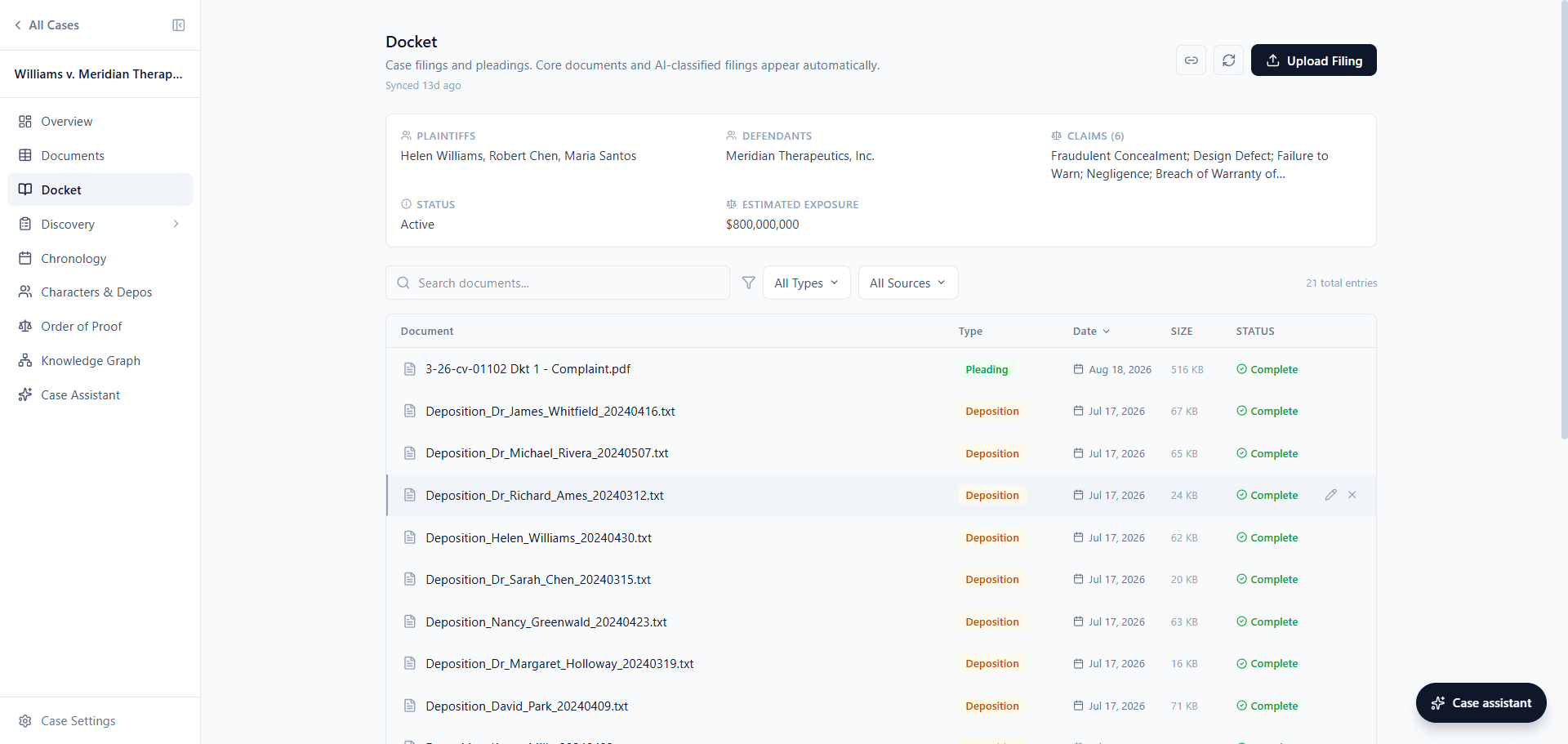
Your co-counsel or your client may prefer to run review on a legacy eDiscovery platform, so to make interoperability easier, we've built overlay export. Lumios takes the intelligent outputs of the platform, your team's coding and the tags it applied, and writes them into a standard overlay load file, one row per document, matched on the fields their platform already uses. You can pick the volume and the columns you want to send, and Lumios checks the file against the volume before it writes it.
The documents index
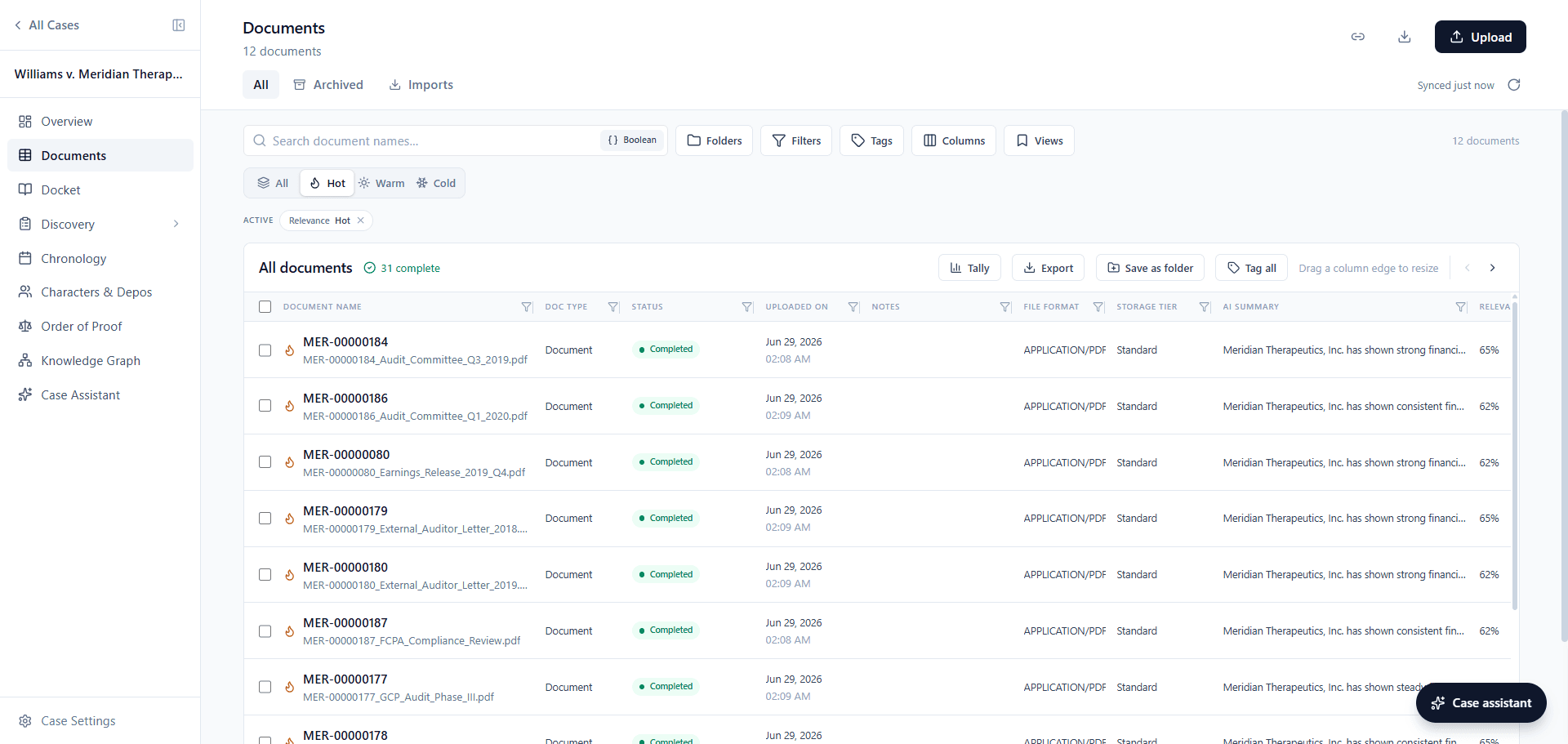
The documents index is a lot more malleable now. You can flip it between hot, warm, and cold to start on the documents Lumios scored highest, sort or filter on any column, and choose which columns you want and the order they appear in. Any arrangement you land on can be saved as a view your team comes back to, and you can group your tags into folders however you like. Lumios can also break the whole collection down for you by document type, file format, and production volume, and you can filter to any slice of it or export it to a spreadsheet.
Sharing NEW
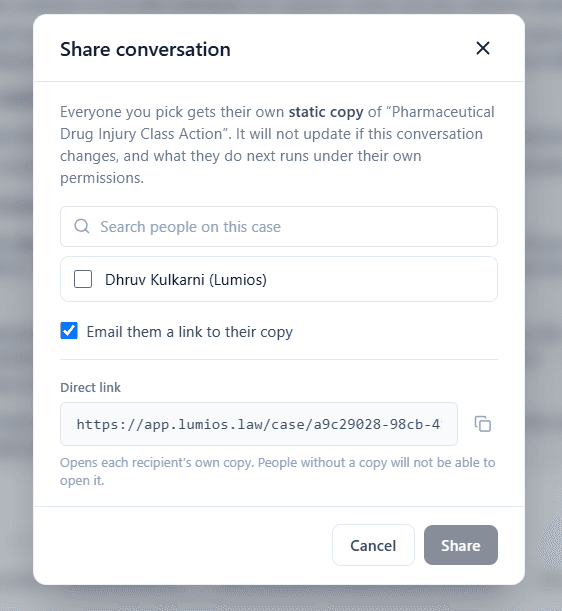
You can now share a chat conversation or a piece of work product with anyone on the case, off the member list, by email, or with a link you copy yourself. Each person gets their own copy to rename, edit, and build on under their own permissions, and Lumios labels that copy with the name of the person who sent it.
You can share documents the same way. A filtered view of the documents index can go to your team as a link, narrowed to the folders, production volumes, and producers you care about, and a finished production can go outside the case as a secure link, with a password, an allowlist, an expiry, and a download cap. You can see in an audit trail who opened it and what was downloaded.
There is also a new role between editor and administrator. A paralegal or a legal operations coordinator on Case Staff can upload documents, run a zip or a load file into the case, link families, and manage the collateral, while your administrators keep the governance settings.
Document Review NEW
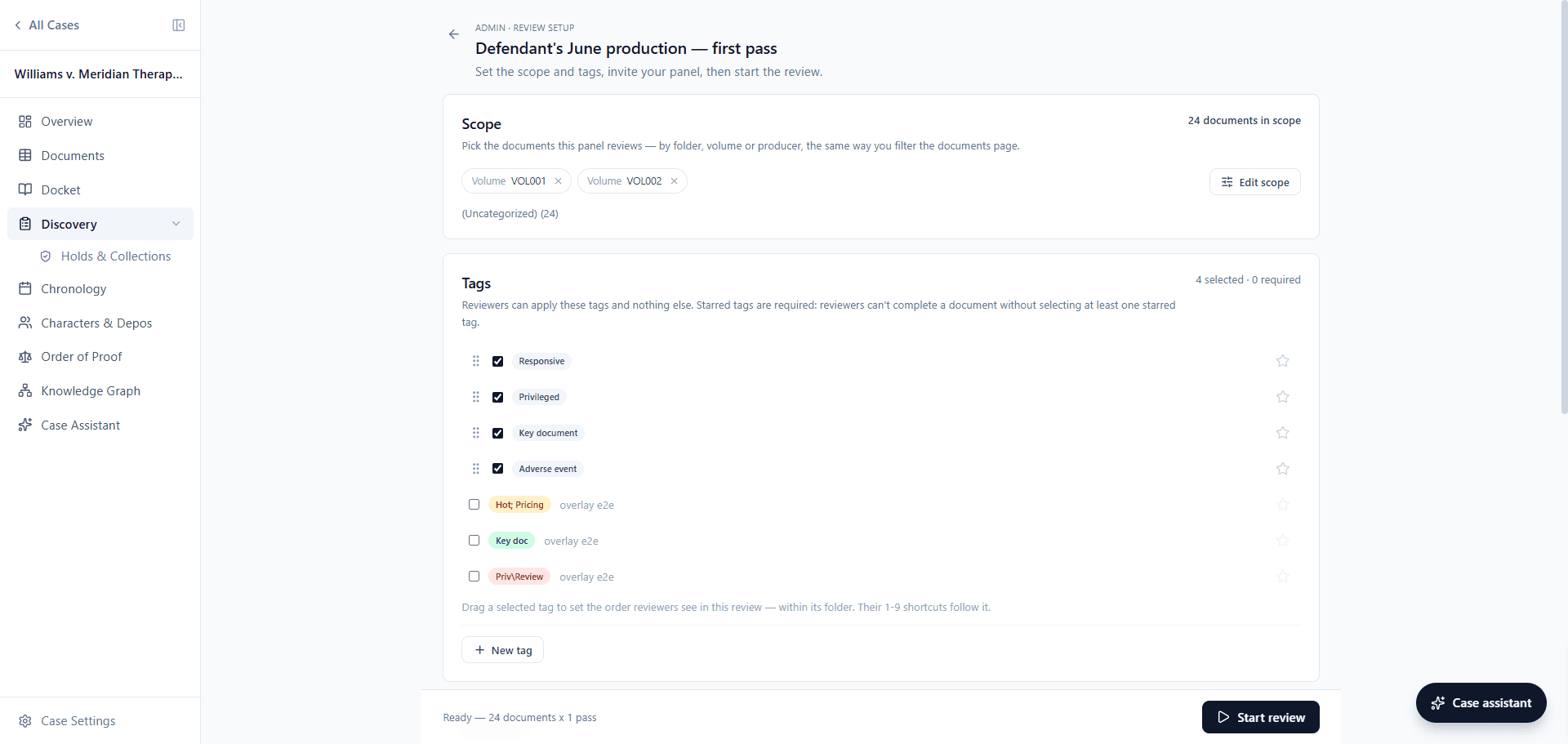
Even with AI doing the heavy lifting, teams still need a linear review when the other side produces. You can now run that whole review in Document Review. You can upload a production of any size straight from your browser, scope the review to the folders, volumes, and producers you want, build the tags your protocol calls for, and invite your contract reviewers by email. Each reviewer gets their own queue holding only the documents you gave them and the tags you wrote, and they sign in on their own permission tier.
It's built for a review team that needs to get through documents fast. Reviewers can code from the keyboard, tagging on the number keys, completing with Enter, and flagging or escalating without reaching for the mouse. Where Lumios has summarized a document, that summary is the first thing in the info panel while they read.
Reviewers can also pick their own work, claiming a batch off the board, coding it, and checking it back in. You can follow all of it from the progress dashboard: where each reviewer stands, how much of the review is done, and what came back flagged. Anything a reviewer is unsure about can be escalated to you or anyone else on the escalation roster, and Lumios writes each settled decision back to the case tags.
What's Next
We're continuing to onboard more firms and legal departments onto Lumios through the fall, and the cases and portfolios keep getting bigger. For in-house teams, we've built out an automated path from intake through discovery, so Lumios takes more of the matter off your team's plate from the day someone opens it. On the litigation side, we're taking on more of the work end to end, from collection through production and into case strategy.
If you'd like to see how Lumios could fit into your world, book a call with us below.
Want to see Lumios in action?
Book a call and we'll walk you through Lumios on your data, or spin up a sandbox so your team can try a case from intake through trial.
Book a CallBest,
Dhruv & Arnav