Welcome to our seventh newsletter.
This month we shipped major updates to the in-house side of Lumios: intake, matter intelligence, portfolio, spend, response workspaces, arbitration, and trends. You can now run a whole matter in Lumios, from intake to resolution. Forward the complaint, the demand letter, the subpoena, the regulatory demand, or the arbitration demand to your Lumios intake address, and Lumios triages it and opens the matter. Lumios keeps the docket updated, does the work through your standard checklist of items for that matter type, and gives you next steps.
On the litigation side, we've continued to improve the platform's robustness as we scale up to handling larger and many more cases with each firm we work with. Lumios now helps with every part of discovery, from what it knows about each custodian, through review, to the production the other side sends you. It matches that incoming production against the requests you sent, so you know which requests each document responds to. Lumios then applies smart coding tags through review and into your own production.
We've spent these past weeks deploying with more law firms and more in-house teams, and most of what we shipped came directly out of those live deployments. Here's the rundown.
Intake and triage NEW
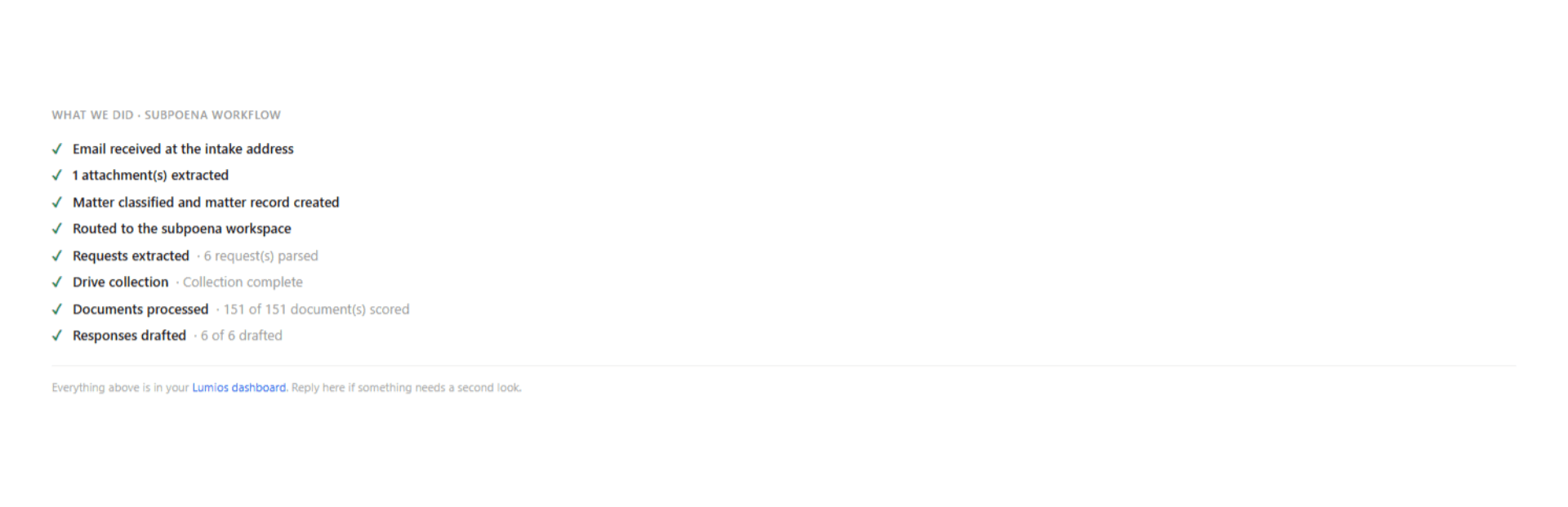
Legal work comes in from a variety of sources, whether that's your registered agent, a business unit, an outside firm, or plaintiff's counsel directly. Tracking all of it by hand is painful and messy. Now you forward it to your intake address, or you give Lumios an inbox to monitor, and Lumios takes it in and tracks it as a matter. It reads the attachment and identifies the matter type and the parties, opens the matter with parties, jurisdiction, and dates filled in, then replies on the thread with a triage recap so the sender knows you have it.
Once Lumios decides what the matter is, it starts the preset workflows for that matter type. Lumios routes a non-litigation matter to the right person in your organization, on rules you configure. For litigation, subpoenas, regulatory demands, and arbitrations, Lumios opens a configurable checklist for that matter type and begins the items on it: the insurance tender, the hold notice, the collection, and the rest of the standard set for that kind of case.
You track every incoming matter in the triage tab, where each one came from, where it stands, and how far it has gotten through its checklist. Lumios puts that checklist in the acknowledgment email so the sender sees what's outstanding, and sends a second notice on the same thread when intake finishes. For a subpoena or a regulatory demand, Lumios builds the response workspace right there at intake. Arbitration demands work the same way: Lumios classifies the demand and opens the matter, pulls and reads the relevant documents, then writes the determination and gives you a fair value estimate. It also adds the matter to its cluster, so you see a wave of templated demands already grouped by theory.
As part of deployment, we connect the relevant data sources across your organization, including your existing workspaces, your policies, and your databases. Lumios pulls the right documents in and uses them, with citations, to write the responses.
Matter intelligence and management NEW
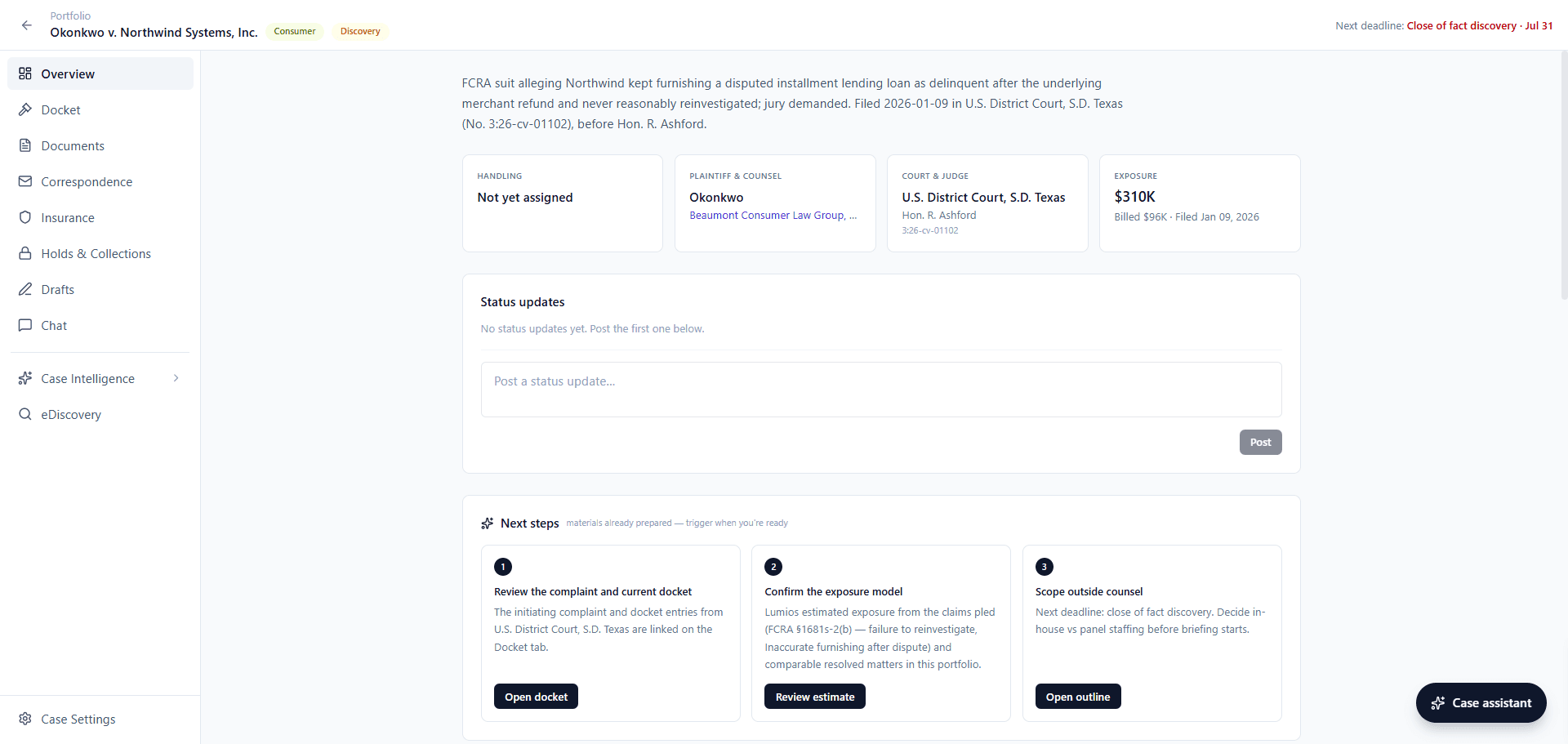
We're pioneering a new approach we're calling matter intelligence. It's matter management with the manual workflows automated, learning across every matter you have, and connected directly to your other systems, including spend. Open a matter and you see who's handling it, the court and the judge, your exposure with the amount billed against it, and the next deadline on the case. Lumios reads the pleadings and gives you that exposure estimate with its reasoning, a summary of the claims, and how the matter compares to similar ones.
Lumios then does the manual work for you. It runs through the checklist for that case type: hold notices, collections where relevant, insurance tenders, and the standard set of items a team has to do on a case like this one. You start and track each step.
Lumios also syncs with the docket and adds each new filing as an entry, tagged with the party that filed it. You and your outside firm post status updates on the matter, and Lumios shows the amount billed on the matter directly under its exposure. Expand a matter's row in the portfolio and you get a one-line summary of where it stands.
The portfolio NEW
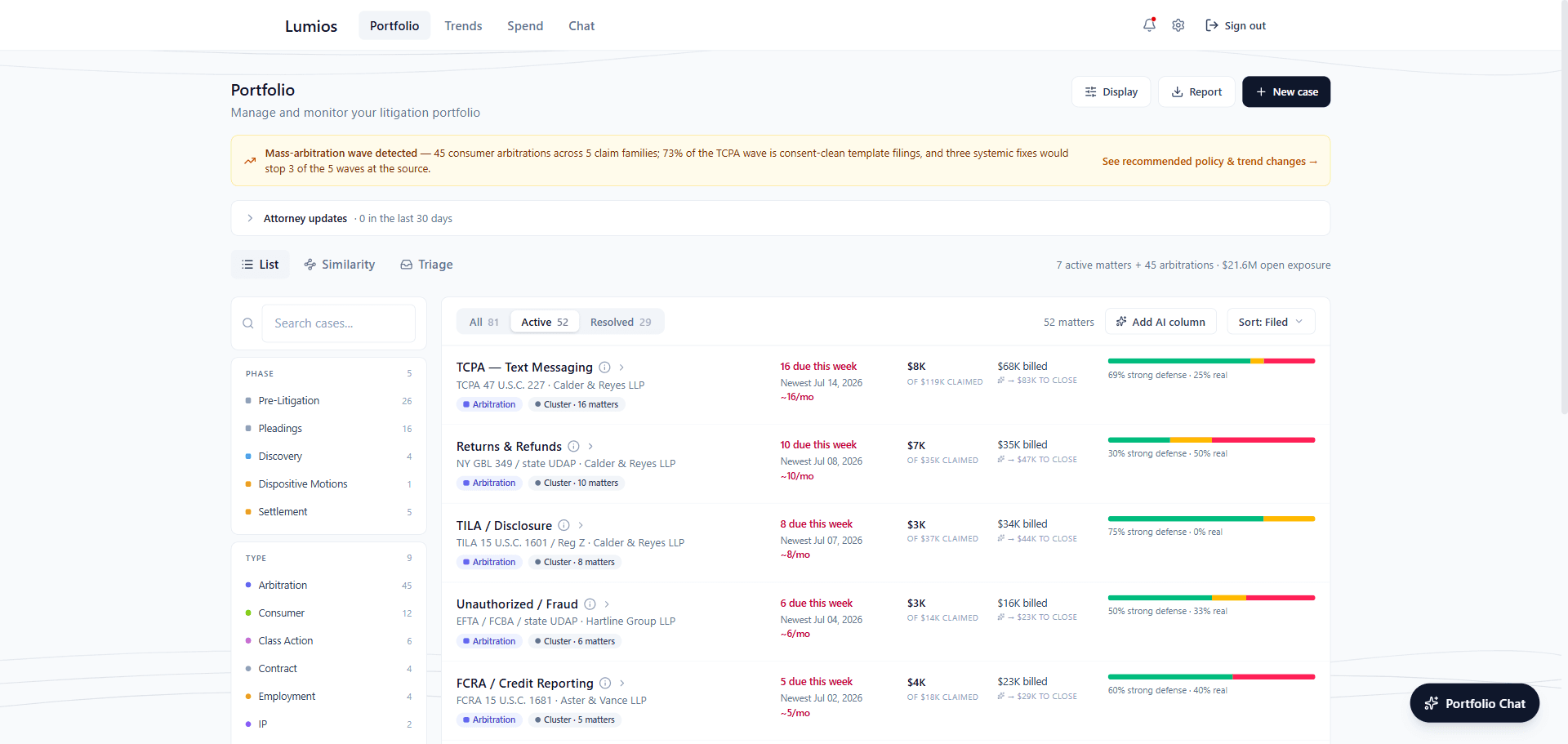
You see every matter in one place, with the critical information on each one: status, exposure, counsel, spend, and stage. Add your own custom fields and configure them the way your team tracks matters. Filter and group your matters however you want, and see any matter's timeline from the same page. When Lumios sees the same fact pattern across matters, it flags it at the top of the page and groups those claims into a cluster.
You can also add AI columns to enrich anything you care about. Describe the column in a sentence, for example whether the plaintiff is a repeat filer or whether an arbitration clause is in play, and Lumios fills it in across every matter and keeps it current.
Outside counsel spend and invoice review NEW
The new spend module reminds each of your law firms to enter cash, accruals, and forecasts every month, along with status updates on their cases, so you get the numbers in real time.
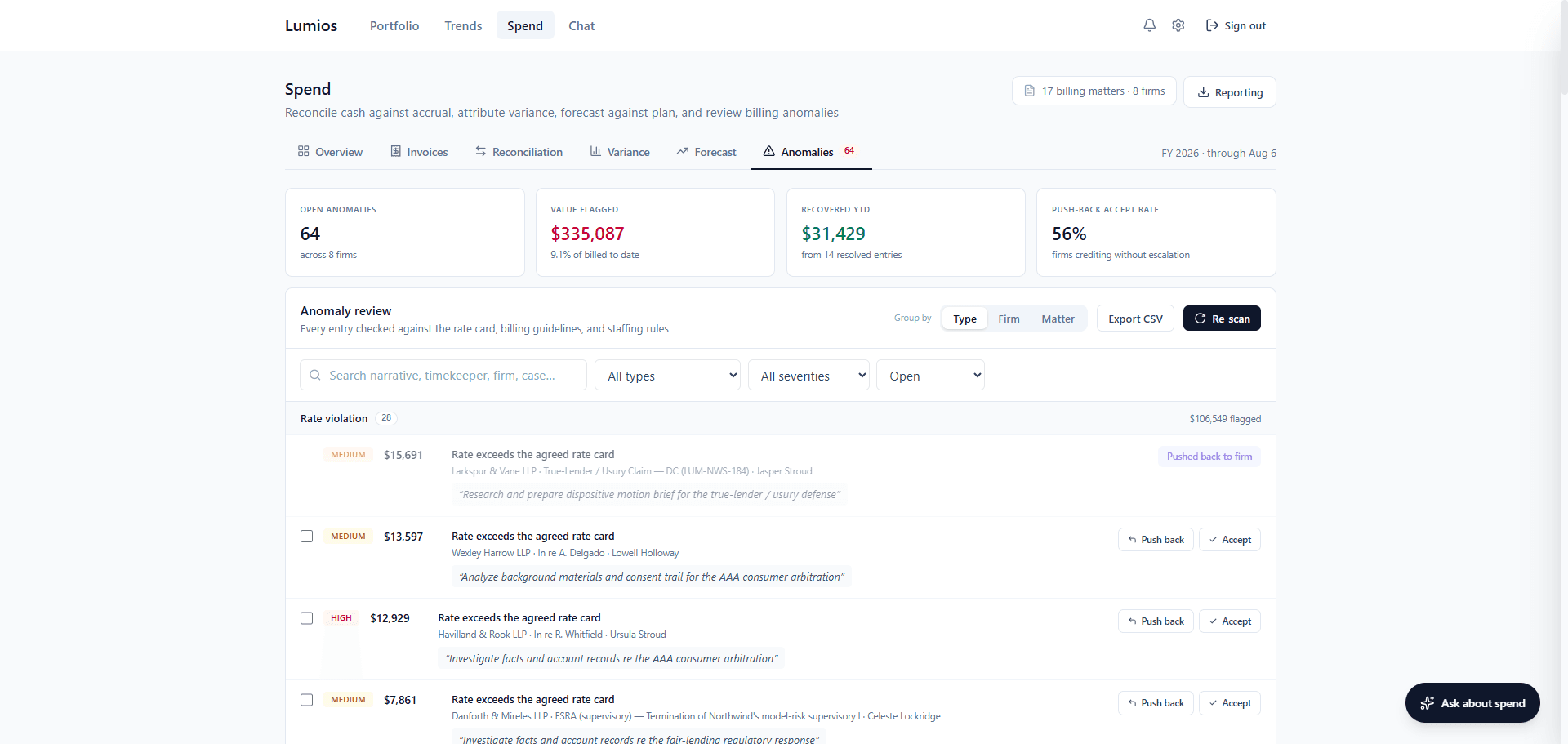
Lumios then reconciles all of it. You see cash against accrual, forecast against actual with the variance, and every invoice run line by line against that firm's billing guidelines, so an anomaly is easy to see. Open one and Lumios shows you the line, the guideline provision it violates, and the invoice it came from.
A firm gets a warning about an anomaly before it submits, in case the entry is a mistake. If the firm submits anyway, Lumios emails you. You send automated pushback emails from there, and you can customize the templates.
You can also chat with spend for insights, export any of it into reports, and read all of it in the dashboards. The Reconciliation, Variance, and Forecast tabs cover cash billed against accrual recognized, next month with a best to worst band, the full year and the quarters after it, blended rate, and burn across the portfolio.
Subpoena and regulatory response workspaces NEW
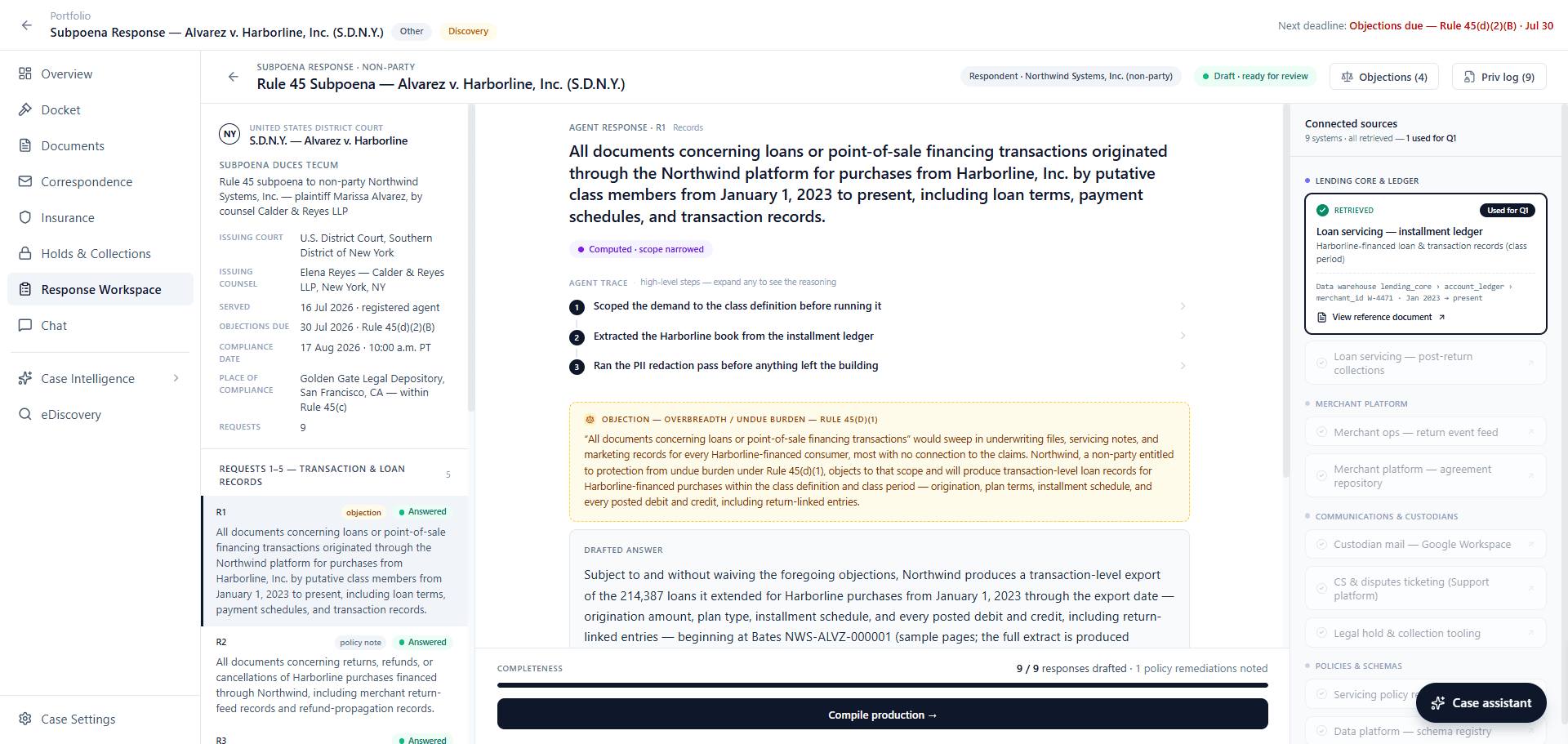
A subpoena or regulatory request asks specific questions about your own business, and the answers are in your own systems. Lumios now has a response workspace for that work. It reads the demand, breaks it into the individual requests, and answers each one from the sources you connect, including your employees' systems, data warehouse, and the policies and records that hold the answer.
You see every system Lumios searched directly in the view, with what it found in each and which requests it answered. Expand any answer and Lumios shows you the numbered steps it took, what it read, and which systems it read, with a link to each. When the demand overreaches, Lumios drafts the objections with the scope you agree to produce.
Lumios builds the privilege log as you go, with the Bates number, author, recipients, description, and basis on each entry. You track how many of the requests you've answered on the bar across the bottom, and when every request has a drafted response you compile the production from the same screen. Lumios now builds these workspaces at intake, on the day the demand arrives. You produce and share straight out of the workspace. Lumios applies redaction suggestions automatically, and you can configure the AI to the redaction types you see most.
Arbitration clusters NEW
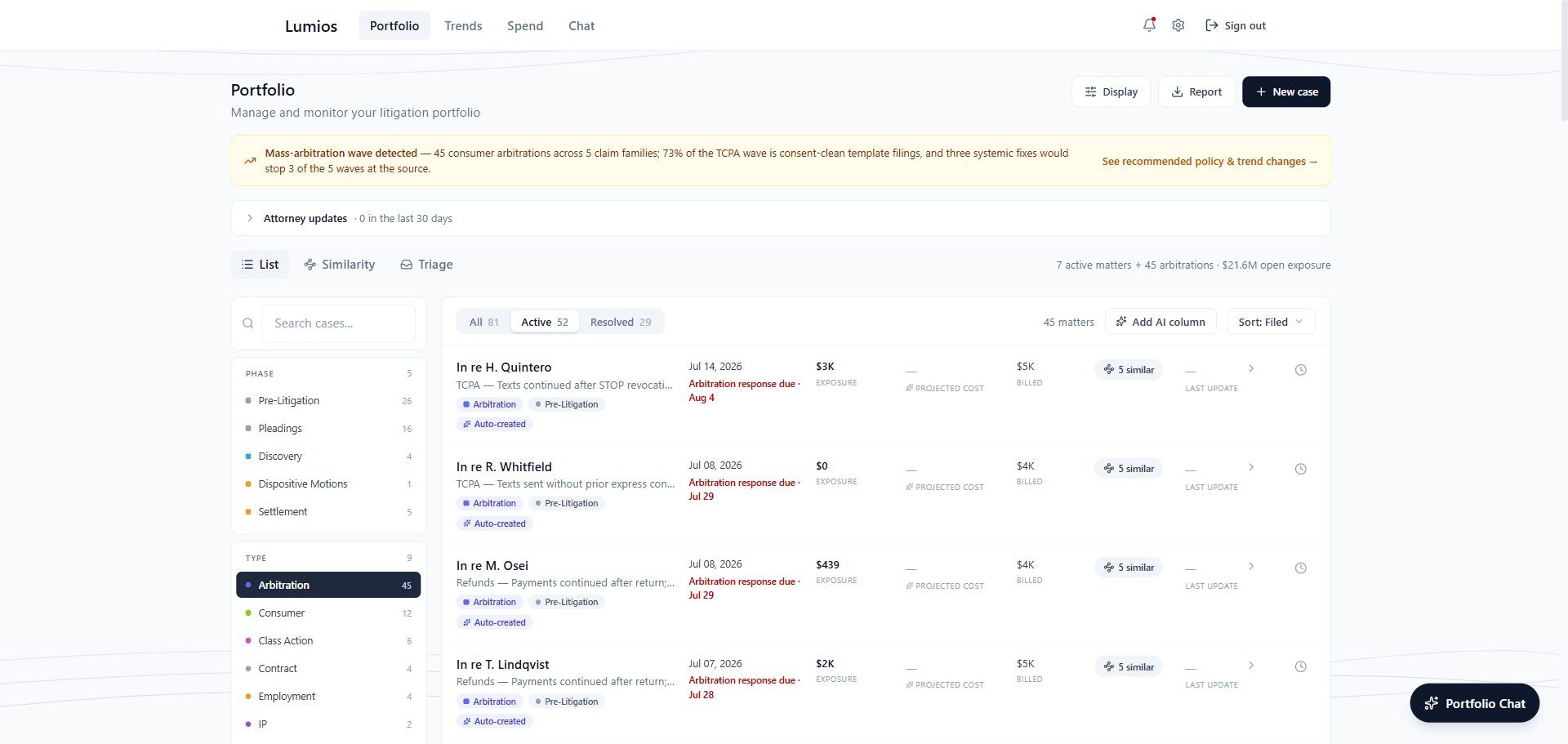
Plaintiff firms file arbitration demands in waves, a few hundred at a time on the same theory. Lumios groups the claims that share a theory into a cluster and shows the cost to defend and how the merits break down across the whole group.
On each claim, Lumios reads the demand and collects the records that bear on it to determine your exposure. It recommends the steps to take, the right fair value, and what to offer, then drafts the response to send back along with its logic on the determination. Click any figure and Lumios shows you the evidence and the math behind it. Judge and arbitrator analytics, built on filing data, show you how a forum has handled claims like yours.
Insurance, reserves, and settlement authority
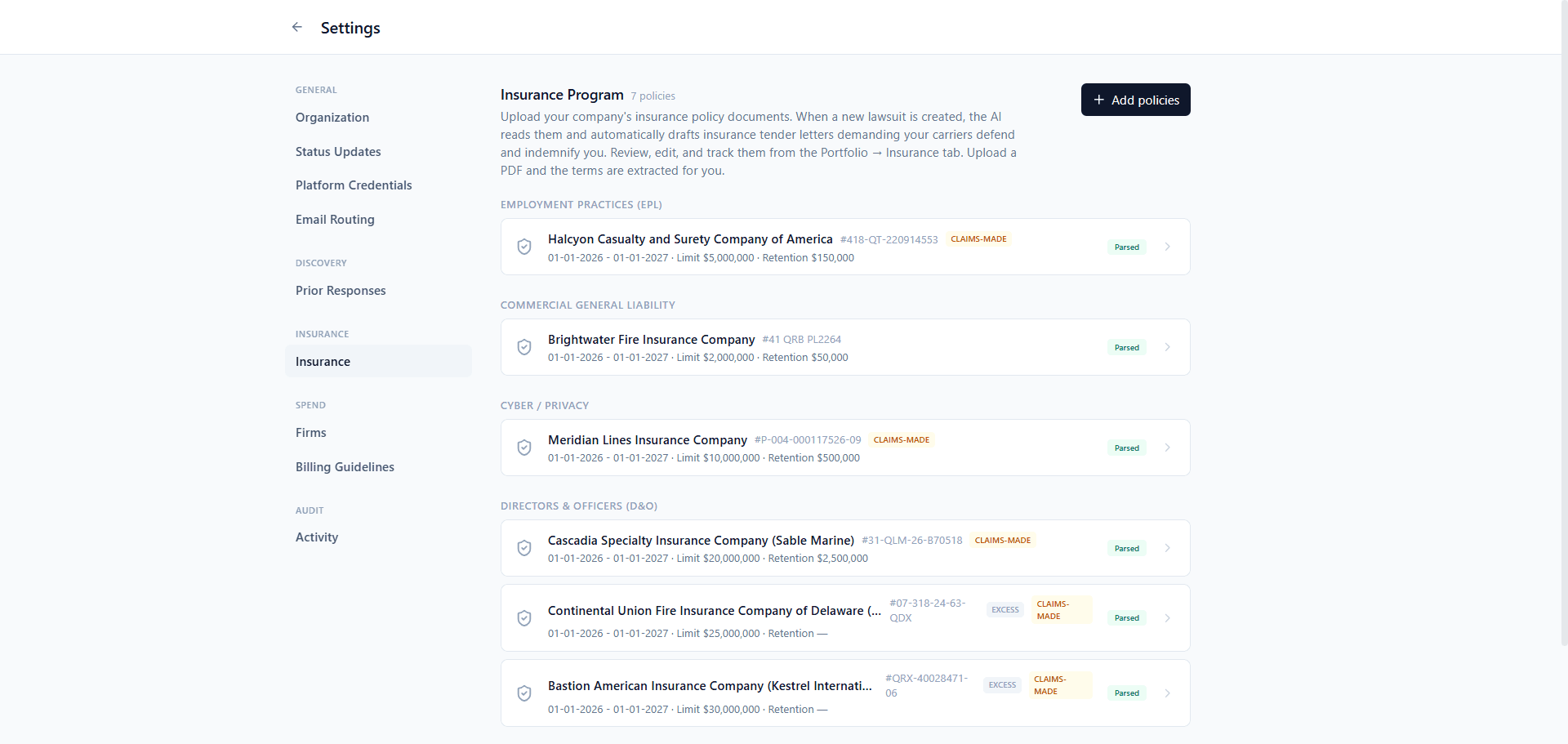
Lumios manages your insurance program as part of the same flow. It drafts the tender to the carrier out of your own policies, tracks the reserves you have set on each matter and the settlement authority you hold, and shows where a matter stands against its retention and its limits. When you walk into a mediation you know what the carrier owes, what you've reserved, and how far you can go without another approval.
Trends
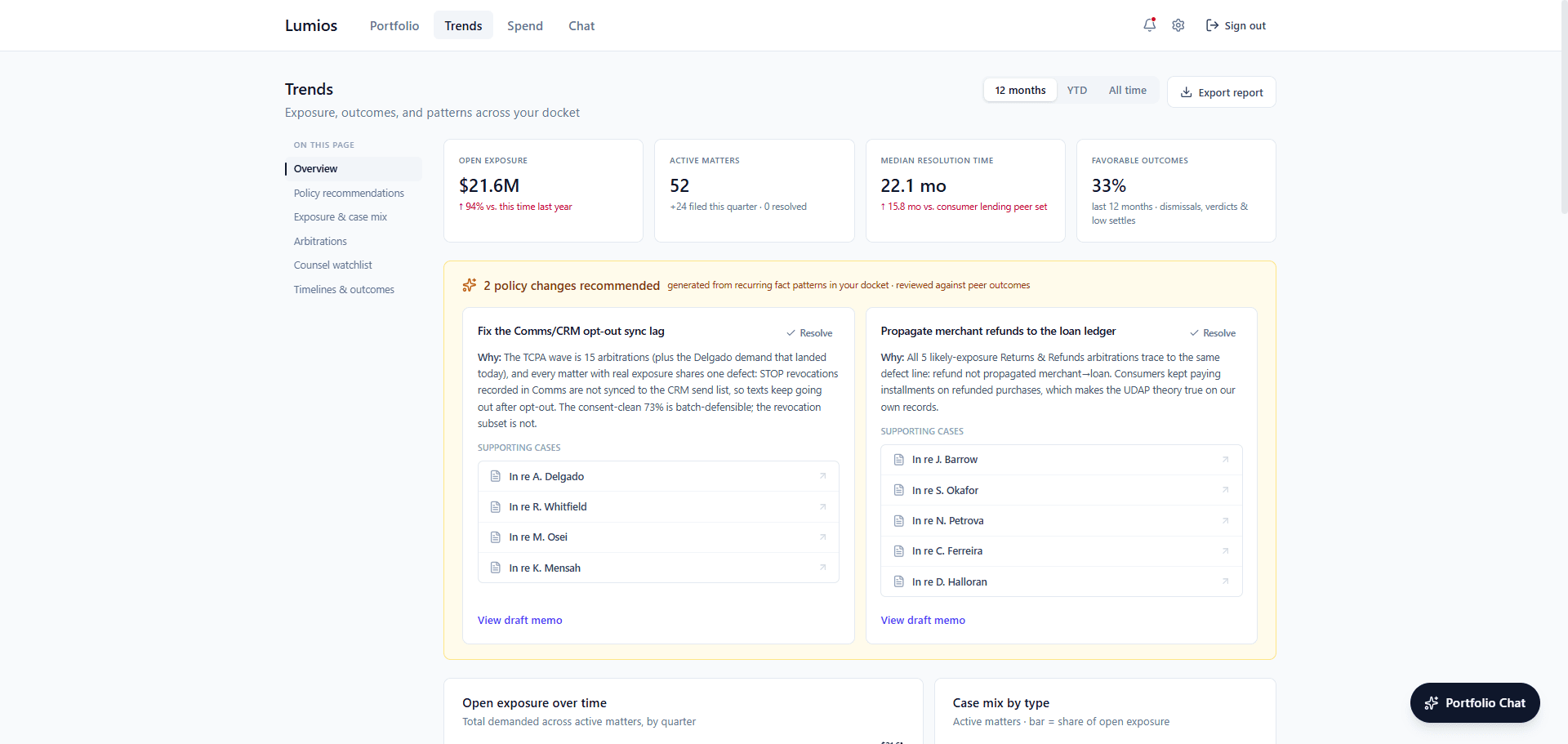
On the Trends page, Lumios consolidates the information across your entire portfolio and runs its analysis over all of it. Your team sees where exposure is moving over time and which of your own policies are causing the most new filings. Lumios recommends the changes to make to those policies, cites the cases behind each one, and drafts the memo.
Lumios also groups every arbitration into clusters by fact pattern and gives you the statistics on each: fair-value exposure against what was claimed, the monthly filing rate, the cost to defend, and the defect behind it. The plaintiff counsel watchlist tracks the firms that file against you again and again, and you get each firm's filing trend, its active matters, the total demanded, and the median settlement. The most litigated policies section names the SOPs and policies implicated across your matters. Timelines and outcomes show how long each case type takes you against the peer median, and how your resolved matters broke down by claim area. Lumios also groups your matters to fit with a public company's requirements for quarterly disclosure.
Connections to your company's systems
We connect to the most common systems your company already runs on. During every deployment, we integrate Lumios into the rest of your systems, whether they're policies, HR, engineering and product, marketing, CRMs, or anything else.
Portfolio Chat NEW
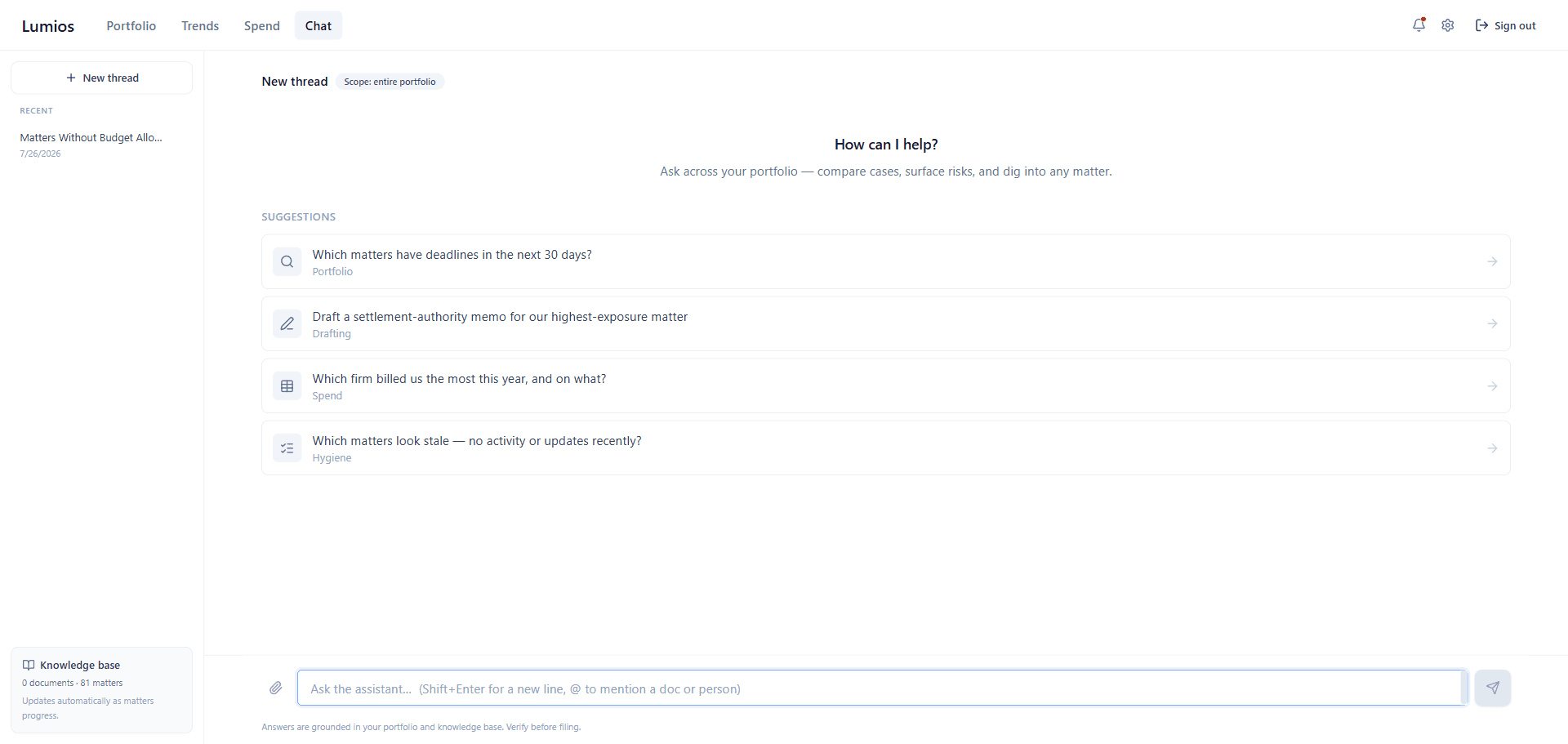
Portfolio Chat works across every matter you have. Ask about your portfolio, your spend, your trends, or any specific case, and every answer cites your own matters. It makes things for you too: reports, spreadsheets, tables, insights, and anything else you need.
Discovery by custodian NEW
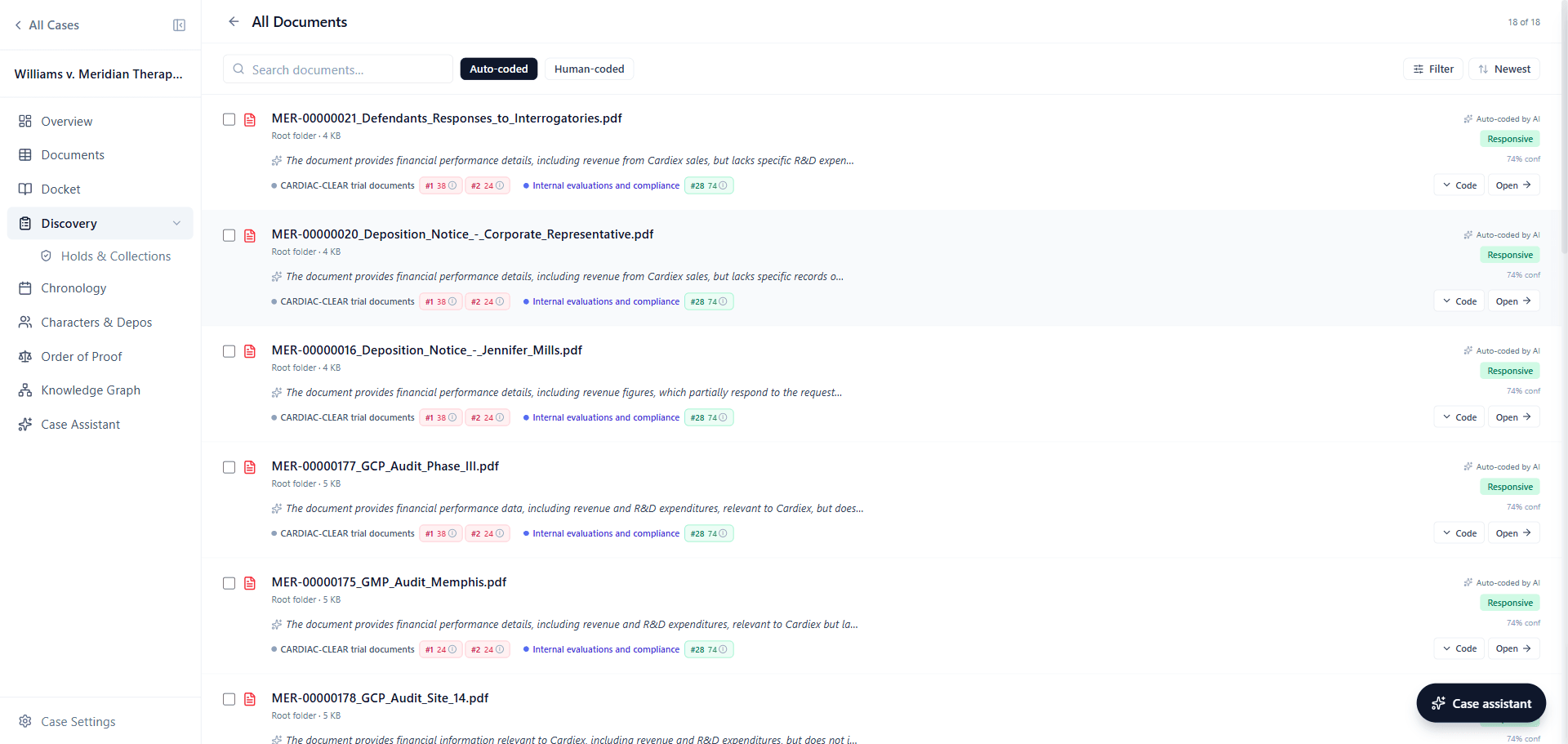
Lumios now keeps custodian intelligence on each person separately: who they are, what you collected from them, and which requests their documents answer. Assign a request for production to a custodian and Lumios reviews that person's documents against it. A custodian can also give Lumios access to their own mailbox, so you collect from that person alone.
The production matcher
When the other side produces, the production matcher checks their documents against the requests you sent. You see which requests each produced document answers, and which requests they answered short. The matcher gives you intelligence into where to push and where to look, so you understand the real answers to your requests.
Smart coding tags NEW
Smart coding tags follow the protocol you already wrote. You define the tags, Lumios pre-applies them during AI review, and your reviewers keep or override each one with every decision logged. Lumios then produces or withholds each document based on those tags.
What's Next
We're continuing to deploy with in-house teams and scale up cases with law firms. If you're interested in seeing how the platform can fit into your litigation workflows, book a call with us below.
Want to see Lumios in action?
Book a call and we'll walk you through Lumios on your data, or spin up a sandbox so your team can try a case from intake through trial.
Book a CallBest,
Dhruv & Arnav