Welcome to our fifth newsletter! In May, we focused on discovery, and live matters drove what we built. We shipped request-level review for requests for production, end-to-end productions that build straight from that review, and automatic redaction of personal and health information. We also added Okta SSO and SCIM for enterprise teams, and sharpened the Case Assistant: it now reads image-heavy evidence and works from the metadata and annotations on every document. Here's the full rundown.
Company Updates
- We're working with a growing number of litigation teams running Lumios on active matters, from boutique firms to in-house departments. Their day-to-day discovery and production work drove most of what shipped this month.
- We added Okta SSO, SCIM provisioning, and directory-based custodian lookup, so larger teams can roll Lumios out through the identity tools they already run.
- We also sharpened case strategy and intelligence: the Case Assistant now reads image-heavy evidence like photos and screenshots, works from the metadata and annotations on each document, and can scope its hot documents and chronologies to the evidence itself.
Request-Level RFP Review
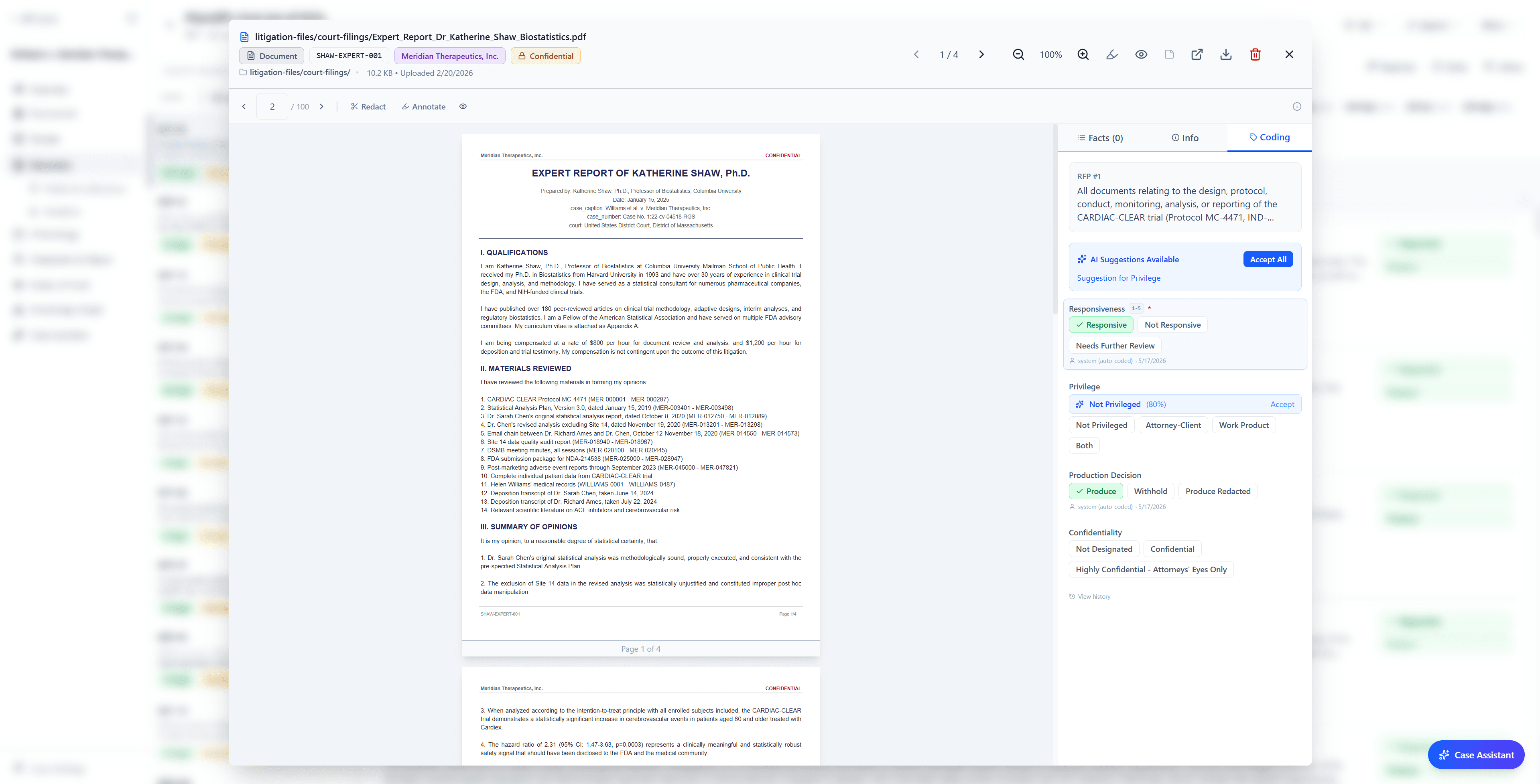
Review in Lumios ties every decision to the specific request it answers. A document can be responsive to RFP #3 without being responsive to RFP #7, so the response, the objections, and the cited documents for each request live together in one per-item workspace. You can open a cited document, check its coding, confirm why it supports the answer, and revise the response without losing your place in the request.
This month we took that scoping down to the party. In a consolidated matter, where one side propounds the same kind of request on two different responding parties, you can scope each request to the party it names. That scope then flows through everything the request touches: the documents that count as responsive, the per-item stats for coding, privilege, and completion, what auto-populates into that party's production, and that party's privilege log. One responding party's documents never bleed into another's set.
Lumios drafts each response from the documents that actually support it, and a Similar Requests panel shows the closest requests from the same set, so a team can reuse language it has already approved while still checking the current request against its own documents.
Productions NEW
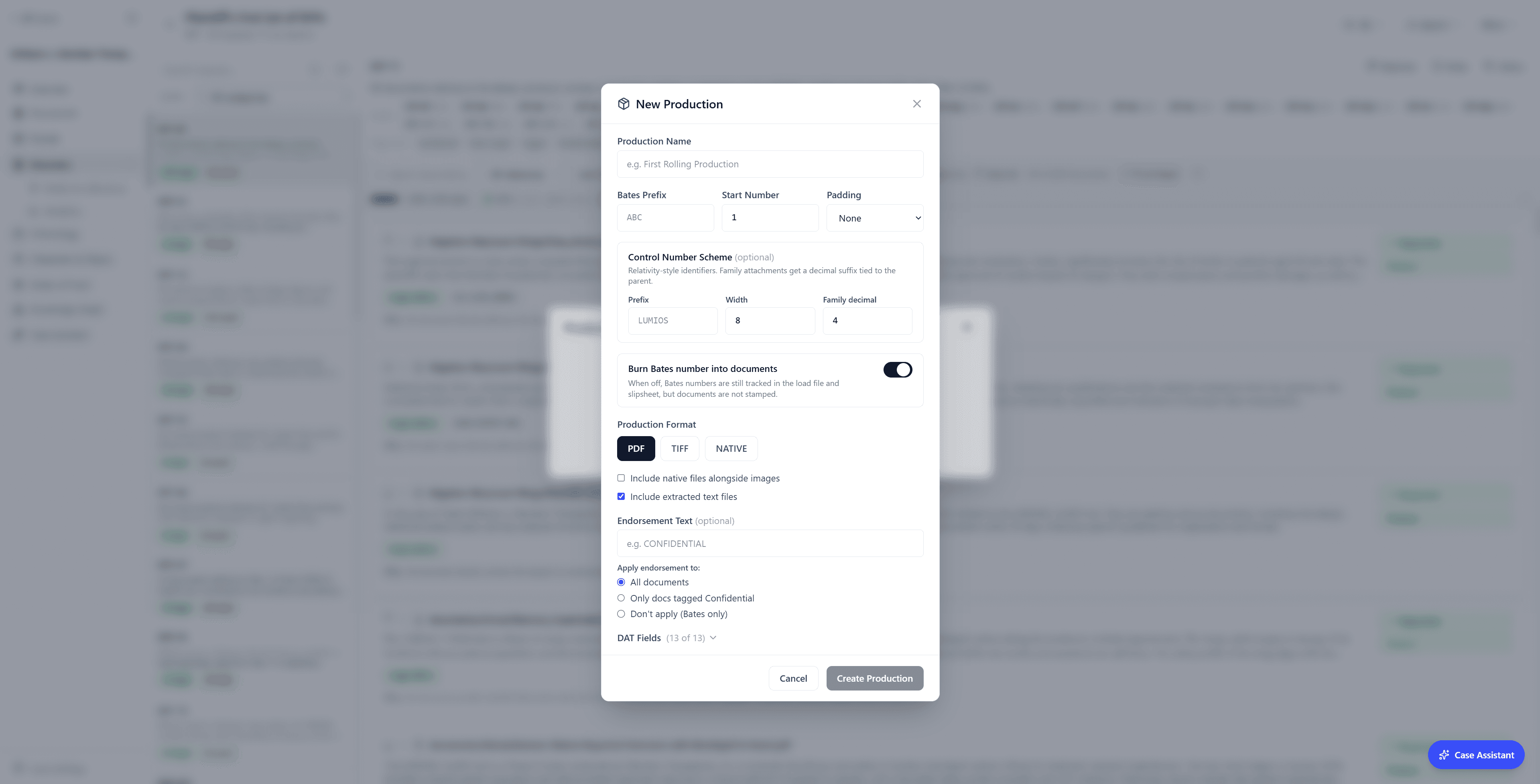
Lumios assembles a production from the review instead of rebuilding it by hand afterward. It classifies every document on the way in: party, confidentiality level, privilege, trade-secret status, and evidence type, and it flags PII and PHI for redaction on its own. When you build a production, all of those calls carry forward, so the set reflects what your team already decided instead of a second pass of manual tagging.
Lumios pulls each confidentiality endorsement straight from the document's own classification rather than waiting for someone to key it in, holds any privileged document for human confirmation before it can leave, and removes the text under every redaction so the words never travel with the file. In a consolidated matter, the set covers only the right party. You review and correct these calls, and Lumios keeps them from slipping through.
The standard production machinery comes with it. Lumios Bates stamps every page with your prefix and padding, converts non-PDF originals like spreadsheets and Outlook .msg emails so they carry the same Bates range, keeps numbering continuous across productions, and generates the privilege log, the production index with its CCP 2031.280 preamble, and OPT and DAT load files with extracted text for the receiving party's platform.
Before anything goes out, the QC checks mirror the questions a team asks before serving: does every responsive document sit under the right request, does anything privileged still remain in the set, do any redactions still need review, and has a document already gone out under an earlier Bates range. An unmatched-documents audit catches anything a reviewer opened but never linked to a request.
Auto-Redaction NEW
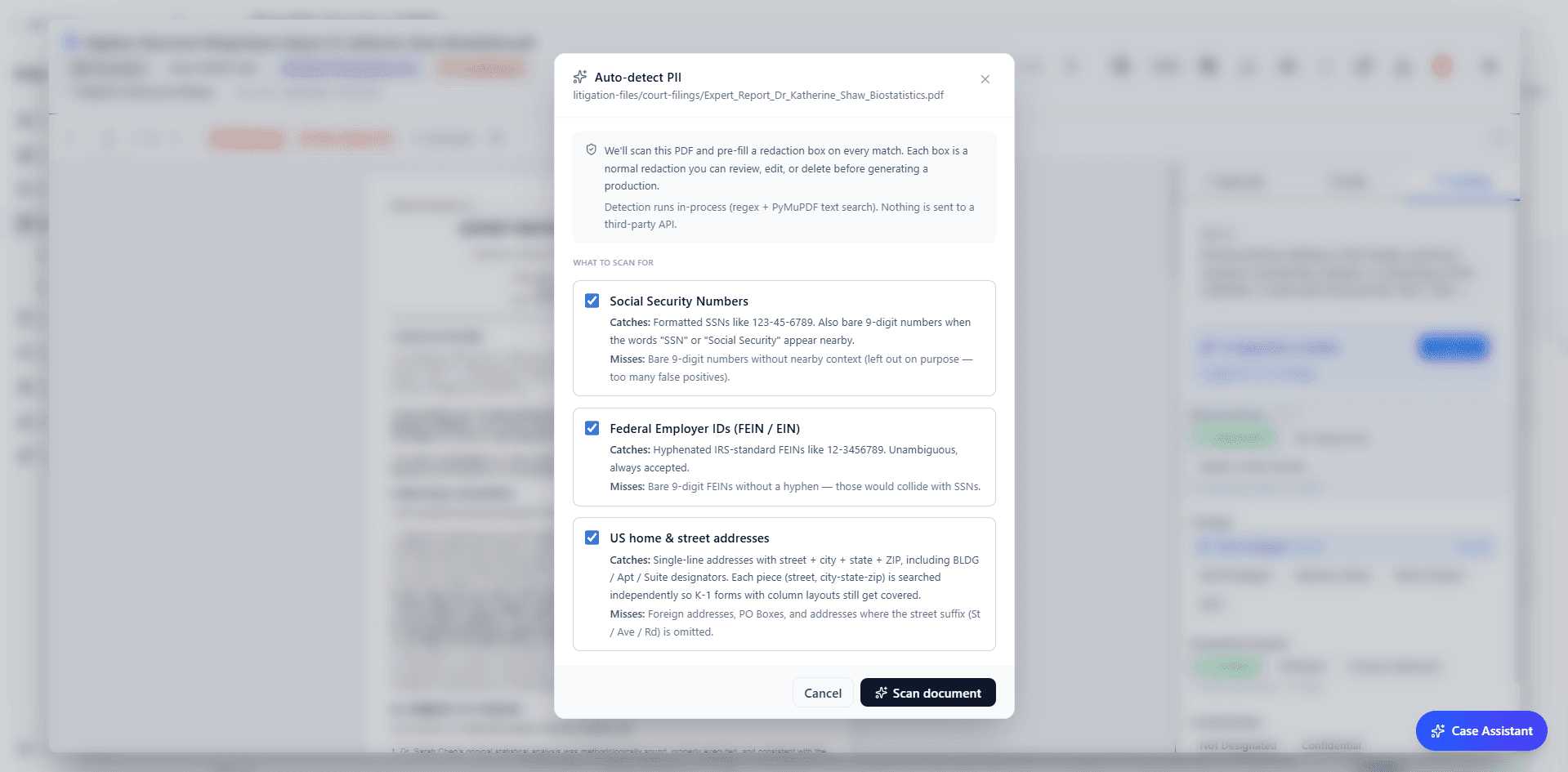
Lumios can now propose redactions on its own. It flags the sensitive material reviewers routinely have to catch before production: SSNs, FEINs, home addresses, dates of birth, patient identifiers, and similar PII or PHI. A reviewer still approves each one before it goes out.
Column-level spreadsheet redaction handles the files where useful fields and sensitive fields sit side by side, like claims reports, payment records, and medical spreadsheets. Select the columns that hold patient names, account numbers, dates of birth, or SSNs, and Lumios redacts them while the rest of the sheet stays readable.
Every redaction stays reviewable, and it carries its reason and source, so the team can confirm each call before production. At production, Lumios removes the text under each redaction, so nothing sensitive ships inside the file.
Okta SSO, SCIM & Directory NEW
SSO and SCIM are standard for enterprise software, and Lumios now supports both through Okta, with group-to-role mapping. Admins connect single sign-on, sync users, and automate account creation, updates, and deactivation from Okta, so access changes happen in the system the company already runs. When someone joins, changes teams, or leaves, Lumios follows Okta as the source of truth.
That same connection powers discovery work. When a legal team builds a custodian list, Directory search finds people in the company directory by name, department, title, and email, then pulls them straight into the hold or collection profile.
Case Assistant
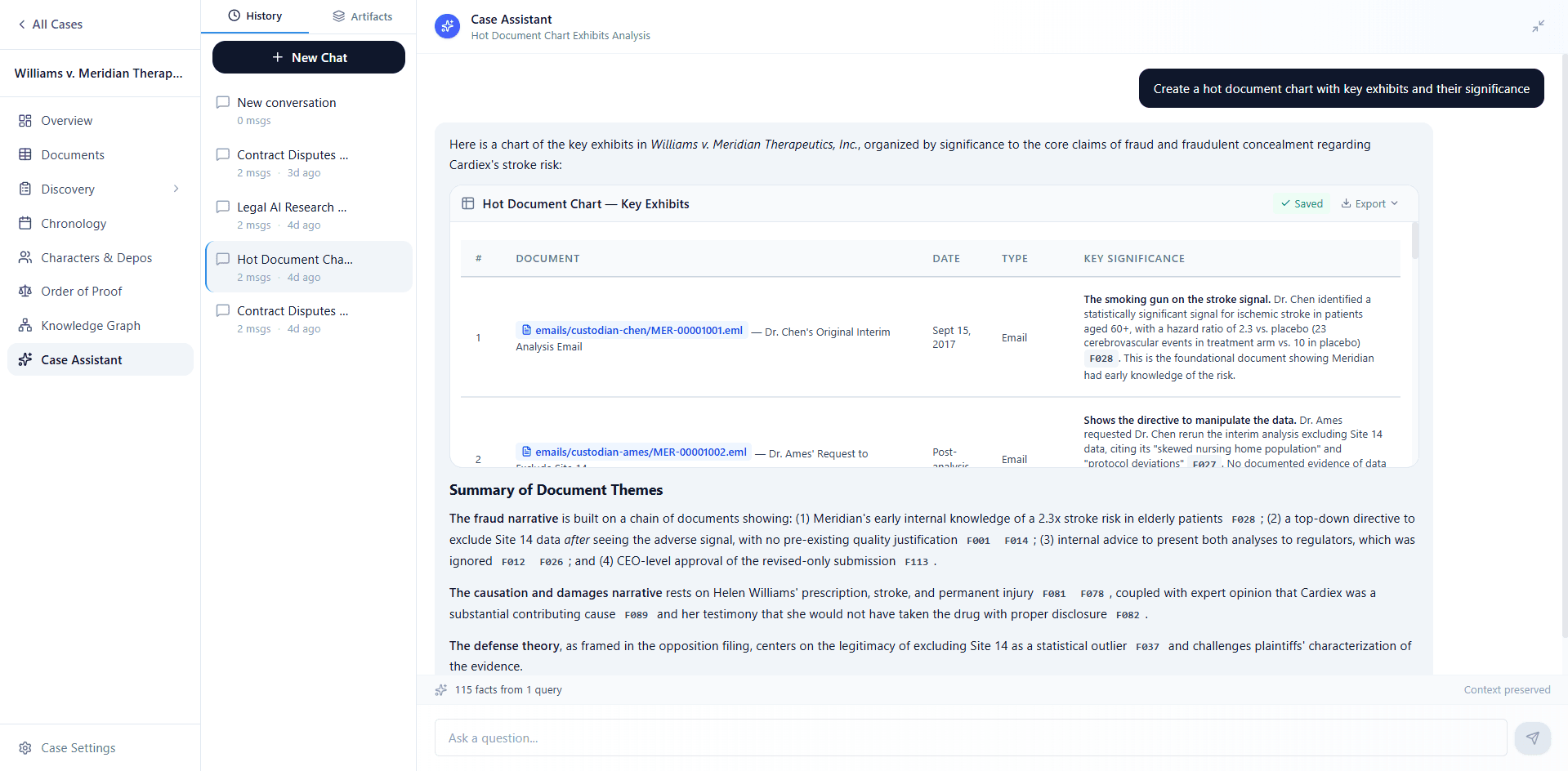
The Case Assistant works across the whole record: it answers questions with citations, surfaces hot documents, and pulls source-backed facts into a chronology. A lawyer can ask which documents support notice or what facts matter for causation, and every answer points back to cited source material. This month we focused on the evidence behind those answers: what the assistant can read, and which sources it pulls from.
It works from more than the raw text now. When the assistant cites a document, it sees that document's metadata and the review team's work on it: the Bates number, document type, party, and privilege or trade-secret flags, along with the highlights, comments, and extracted facts a reviewer has added. Ask which documents support notice, and the team's own markups shape the answer, not just what the page says.
When it builds a chart or a chronology, it starts from the underlying evidence (exhibits, emails, photos, records) and uses the pleadings and discovery papers as context where they help. So the chart tracks the actual documents instead of drifting into a summary of the pleadings.
It also reads more of the record than it used to. Lumios converts HEIC and HEIF photos at upload, so an iPhone picture joins everything else a team can preview, search, and run through the pipeline, while the original file stays intact.
Lumios also reads the images themselves. For every picture it writes a caption, lifts any text off the image, and tags what the picture shows, then makes all of it searchable. The assistant queries across that layer, so a relevant photo or screenshot turns up in search, hot documents, and answers even when the file holds no typed text.
What's Next
We're rolling out new deployments steadily, with both law firms and the in-house legal teams they work with. The more of both that run on Lumios, the more it becomes a collaborative workspace: a firm and its client working the same matter side by side, on the same documents and the same productions, instead of shipping sets back and forth. If you want to help shape it, we'd love to hear from you.
Want to see Lumios in action?
Book a call and we'll walk you through Lumios on your data, or spin up a sandbox so your team can try a case from intake through production.
Book a CallBest,
Dhruv & Arnav