Hi everyone, welcome to our September newsletter.
This month, we made major updates to both in-house litigation and law firm workflows as we continued rolling out the product to more enterprises and expanded to more and larger cases with law firms.
In-house teams can now automate workflows across more matter types and get deeper insights into spending and outcomes, with budget planning and leadership reports built from their matter data. For law firms, we've added a smarter privilege and document review workflow, deposition outlines you can tailor to your style, and video and audio analysis with timestamped facts and transcripts. You can use those facts across chat, deposition preparation, and your case chronology.
Here's the rundown, starting with in-house counsel.
For in-house counsel
A broader suite of matter workspaces
We've expanded the suite from subpoena and regulatory responses and individual arbitration to include employment charges, pre-suit demands and filed complaints, mass arbitration, personal-injury claims, law-enforcement requests, and lien notices. Your team can work through each type of matter with the relevant records, assessment, and proposed response or next steps together.
 1 / 3
1 / 3Subpoena responses and privilege review
Lumios helps you work through a subpoena from the individual requests to the production. It breaks out each request, collects relevant records from your employees' systems, data warehouse, and policies, and drafts answers with citations to the supporting documents. You can examine what Lumios searched and read behind each answer. Where a demand overreaches, Lumios drafts objections with the scope you agree to produce.
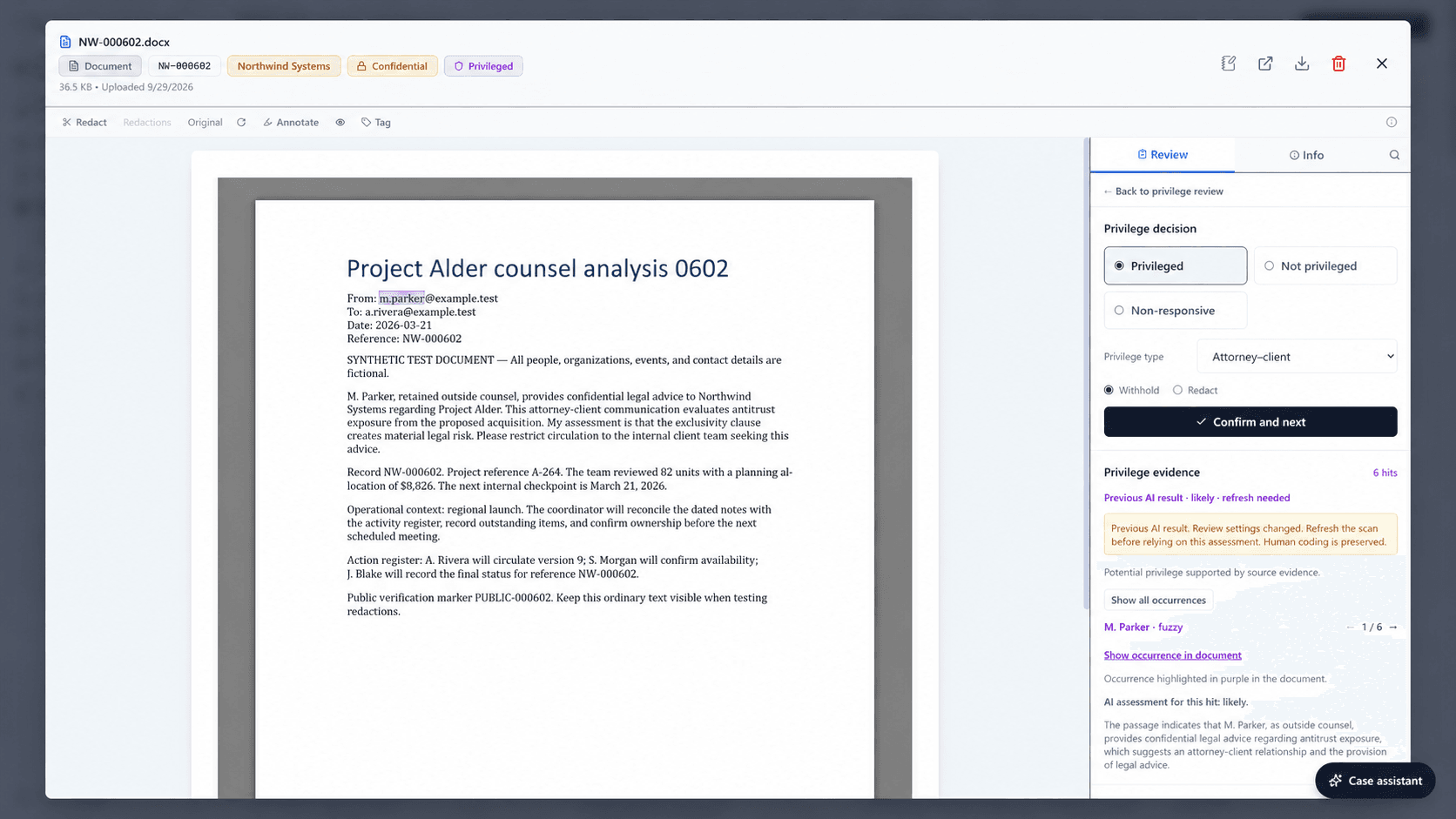
Lumios also recommends which documents to withhold or which passages to redact, with the evidence behind each recommendation. Your team can confirm or change those decisions, with the AI configurable for the redaction types your team sees most.
Regulatory investigations
You can use Lumios to compare a regulator's questions with the policies, disclosures, product settings, and supporting records relevant to the investigation. Lumios can prepare responses and identify changes to consider where the evidence points to a problem. You can examine each finding alongside its source material and proposed remediation.
Employment charges
You can examine an employment charge against the employee's timeline and performance records, along with evidence about comparable employees. Lumios uses the records provided for the charge to prepare a position statement and response letters.
Pre-suit demands and filed complaints
You can use Lumios to assess a pre-suit demand and prepare a draft that disputes the claim, requests supporting records, or proposes time for both sides to investigate. For a filed complaint, Lumios can prepare drafts for your team and outside counsel, including an answer, a motion to dismiss or compel arbitration, and service or deadline agreements.
Individual and mass arbitration
For an individual arbitration, you can examine the claim's records and assess fair value against the cost to defend. Lumios can prepare a proposed response or settlement draft using the assessment and evidence from the matter.
For mass arbitration, you can review claimant eligibility and supporting evidence, then follow filing status and readiness across the claimant roster. Your team can compare individual claimant findings across the group when deciding which claims need further investigation and how to respond.
Personal-injury claims, law-enforcement requests, and liens
You can examine incident records and an assessment for a personal-injury claim, the records requested by law enforcement, or the basis of a lien notice. In each workspace, you can compare the proposed actions and recommendation with the documents behind them.
Intake, correspondence, and assignment
Your team can now keep incoming emails, attachments, and follow-up correspondence connected to the right matter. Lumios uses the matter type and your assignment rules to route incoming work to the right person or team. The attorney or paralegal taking it on can continue with the intake summary, correspondence, and work Lumios has already prepared.
Insurance and carrier billing
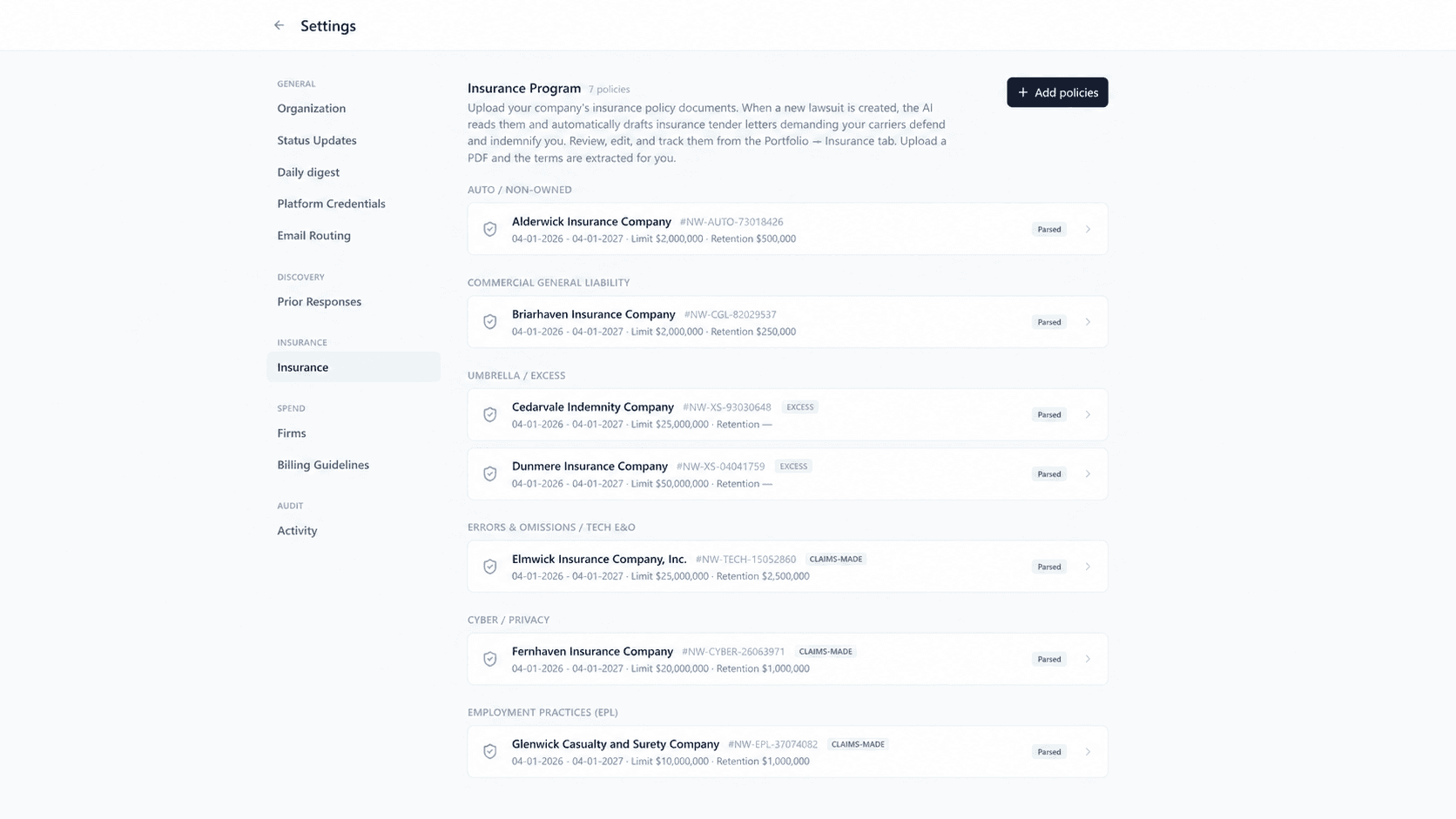
When a carrier may owe a defense, your team can use Lumios to assess coverage against the policy and matter records and prepare a tender. We've added support for the defense bills that follow. Lumios can check those bills against carrier guidelines and prepare a billing export for submission. Your team can examine the billing findings in the same matter as the coverage and tender work.
Legal spend, budgets, and counsel approval
You can examine why legal spending exceeds plan and use that analysis to prepare the next year's budget. Lumios can draft the budget with assumptions your team can adjust. For a proposed outside-counsel engagement, Lumios can check the budget, existing firm commitments, and billing concerns as part of the approval process.
 1 / 4
1 / 4Leadership reports and matter economics
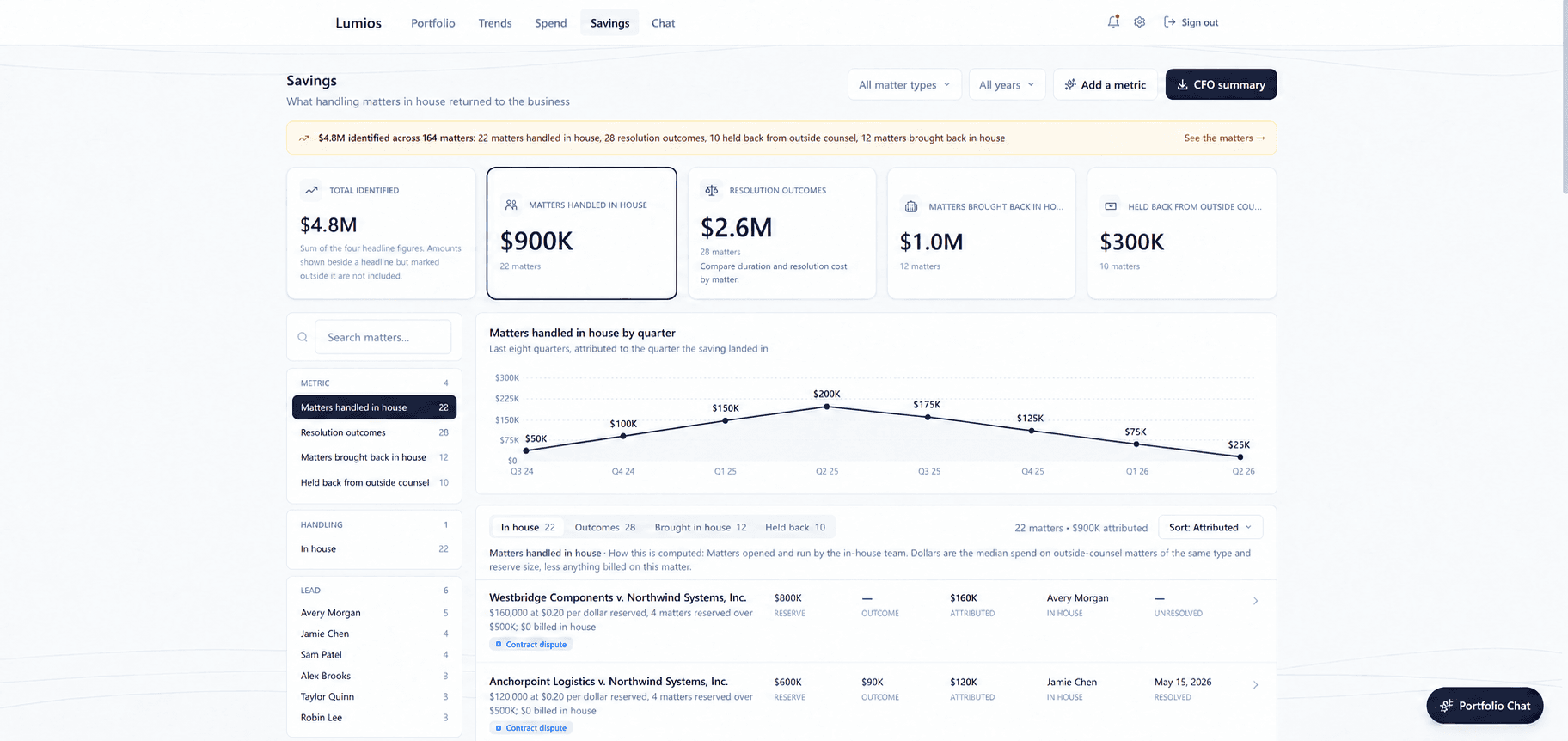
Lumios now allows you to create litigation reports in your team's style, using live matter and spending data from your portfolio. You can include granular metrics on spending, resolution costs, duration, and outcomes, with the underlying matters available for follow-up. You can also prepare finance summaries and compare results across matter types to explain where costs differ and what drives them.
You can also review savings attributed to handling matters in house, resolution outcomes, and changes in outside-counsel use, then examine the matters behind each metric.
Connections to your existing systems
Lumios can exchange matter information and documents with the systems your legal team already uses. We select and configure the connections for your deployment around the records your team needs. Your team can also bring relevant business records into the matter review, such as policies, operational tickets, and account history. You can examine those records alongside the matter documents when preparing an assessment or response.
For law firms
Privilege review
Lumios can now recommend whether to withhold a document or redact a passage and show the supporting communications behind its recommendation. Your reviewers can confirm or change the decision and explain their reasoning, which Lumios uses to refine later recommendations. Lumios then creates the privilege log from your team's decisions and fills in the fields from the documents and review record. You can review the completed entries alongside the production.
Deposition preparation
You can ask Lumios to prepare a witness outline around the topics you want to cover, with supporting quotations and exhibits from the case. Lumios can also suggest strategy notes about the admissions to seek. You can add your own notes and extend the outline with another topic as you develop the examination. You can also use chat to refine the outline, review the changes, and undo them.
 1 / 4
1 / 4Video and audio evidence
Lumios can now analyze video and audio recordings, extract timestamped facts, and link each fact to the relevant recording segment. You can use those facts across the platform: ask about them in chat, include them in deposition outlines, and connect them to events in your case chronology. Lumios also uses them in relevance analysis and the case knowledge graph, alongside the facts from your documents.
 1 / 2
1 / 2Case Assistant
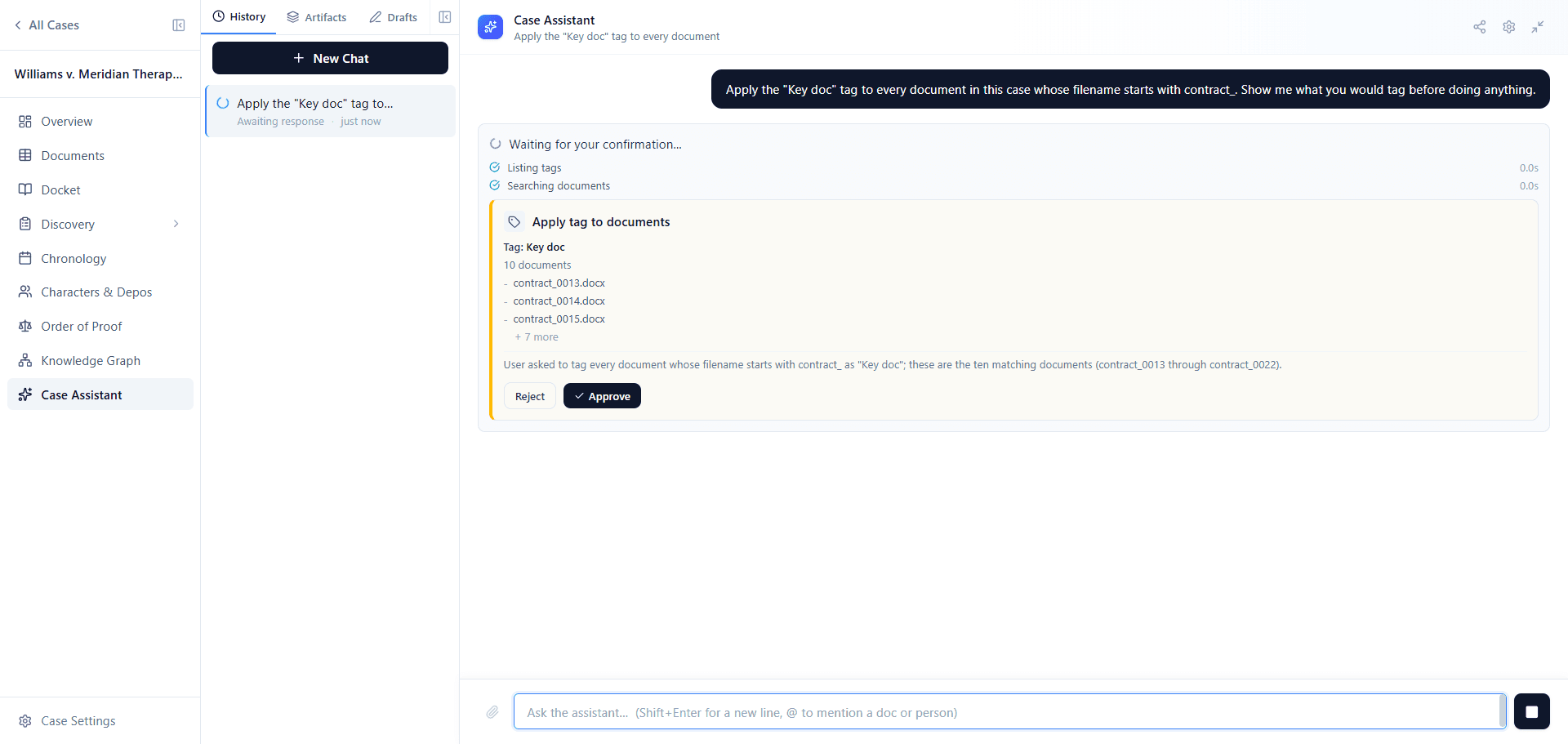
You can ask the Case Assistant to find the documents that answer a question, then apply smart coding tags, organize them into folders, or prepare an export. It shows you the selected documents and proposed changes for your confirmation before it takes action.
What's next
We're continuing to deploy with in-house teams and scale up to more and larger cases with law firms. If you're interested in seeing how the platform can fit into your litigation workflows, book a call with us below.
Best, Dhruv & Arnav